Blog Page 327

Personal Loan Tax Benefit Conditions

personal loan tax benefit

An instant personal loan is among one of the easiest finance options. All your dreams can be fulfilled by taking an Instant personal loan. You can use a personal loan for any requirement such as higher education, medical expenses, family holiday, job loss, wedding expense, unfavorable event etc. A personal loan is also known as an unsecured loan. No collateral is required to avail the personal loan. As it is unsecured loan it is offered at higher interest rates. An instant personal loan is very popular as it is easy to avail and comes with fewer restrictions.

Indian Income Tax Act allows various tax exemptions and deduction on interest payment for loan such as home loan, education loan etc. In case of personal loan tax deduction or exemption are allowed in certain conditions. In this post, we will be discussing personal loan tax benefit conditions.

Also Read – 10 Best Instant Personal Loan Apps for Quick Cash Requirement

Personal Loan Amount and Tax

The personal Loan amount is not taxable. This means that the loan amount given to you by bank or NBFC is not considered as a part of your income when you are filing income tax returns. You need not to pay any income tax on the personal loan amount. However, the loan should be taken from valid sources such as a bank, financial institution. A loan taken from relative might be considered a part of your income.

Personal Loan Tax Benefit Conditions

Personal Loan also comes with tax benefits provided it is used of a specific purpose. Only interest payment is allowed for the income tax deduction. The conditions under which deduction is allowed are given below.

#1 Amount Used for Business Purpose

If the personal loan amount is used for the business expansion or business purpose, the borrower can avail tax benefits on the interest paid. The amount paid as an interest component in the loan can be deducted from the profit before calculating the tax liability. This deduction will reduce the next taxable profit of the business and thus reducing tax liability. No maximum limit is applicable for the interest amount which can be claimed for a tax deduction.

#2 Amount Used for Purchase/Construction of Real Estate Property

If you use a personal loan for construction or purchase or real estate property you can avail tax deduction under section 24. The maximum amount allowed under this case would be 2 Lakh for self-occupied property. In order to claim this deduction, you need to submit a certificate which is issued from the borrower’s bank which certifies that amount taken as a loan is used for purchase/construction of real estate property.

#3 Amount used for the purchase of any other assets

If you use a personal loan for the purchase of any other assets such as shares, jewellery, non-residential property you can not directly avail tax benefits on interest paid. However, Interest expenses get added to the cost of purchase of an asset. Whenever these assets are sold you can get an advantage of capital gains. This means your tax liability will be reduced in the year of sale of the asset.

personal loan tax benefit

Important Points about Personal Loan Tax Benefits

Few important points to consider while taking personal loan are given below.

  • The amount received from Personal Loan is not taxable in nature. You need not to consider this amount as your income while calculating income tax.
  • Only interest amount of payment can be claimed for tax deduction under various conditions mentioned above. You cannot claim the principal component for the tax deduction.
  • You are required to submit necessary proof to income tax authority about the usage of personal loan. You can avail such certificate from the bank or from auditors.
  • If you want to claim ax benefit on a personal loan, you are required to keep a copy of all important documents such as sanction letter, expense statement, auditor’s report etc.

10 Best Mutual Fund Mobile Apps for Investment & Portfolio Tracking

Mutual Fund Mobile Apps – Mutual Fund is one of the best investment options for the long-term. You can invest in a mutual fund directly or via distributor/agent. In order to improve services and investor experience, most of the mutual fund houses have launched online portal and mobile apps.

You can use Mutual Fund Mobile Apps for investing in the mutual funds on the go. You can even track your mutual fund portfolio using these apps. There are multiple mutual fund mobile apps available in the market. In this post, I will share detail about 10 Best Mutual Fund Mobile Apps. These apps will help you to invest and track your mutual fund portfolio on move.

mutual fund apps

10 Best Mutual Fund Mobile Apps

Here is the list of Best Mutual Fund Mobile Apps along with key features. Make sure to compare all features before selecting the best mutual fund mobile app.

#1 myCAMS Mutual Fund App

The first mutual fund mobile app in the list is myCAMS. Key Features of myCAMS Mutual Fund app is given below.

  • You can invest and track multiple mutual funds using myCAMS app.
  • This app is easy to use and operated from MPIN.
  • You can invest in mutual funds via SIP, lump sum and NFO.
  • You can set my watch list to monitor your investments.
  • App provides schedule transaction option for setting up future transactions.
  • You can view PAN level portfolio.
  • KYC update and Aadhaar based eKYC on the move.
  • You can redeem or switch funds using this app.
  • Two-factor authentication for enhanced security.

The only drawback of this app is it does not support some leading mutual funds AMC like Franklin India, Reliance Mutual Fund etc. You can download this app from Google Play.

#2 Coin by Zerodha

Coin by Zerodha is next in the list of best mutual fund apps. It is commission free direct mutual fund investment platform. All investment done via Coin Zerodha is completely free. Key Features of Coin by Zerodha are given below.

  • You can have a single unified portfolio view for all direct mutual funds, ETF, stocks and bonds.
  • Coin provides detail about Annualized (XIRR) and absolute returns.
  • It supports UPI payment for SIP.
  • Coin offers Single capital gain statement, P&L visualizations.
  • You can create, pause, and modify your SIPs anytime with click of a button.
  • It provides a clean and simple user interface.

Coin is free investment platform and offer facility to invest in direct mutual fund. You should try Coin for Mutual Fund Investment. You can directly download Coin from App store.

#3 Groww

Groww is one of the best mutual fund mobile apps. You can invest in direct mutual funds with zero commission using Groww. Key features of Groww are given below.

  • Dashboard for tracking all your investments.
  • Calculate returns through mutual fund SIP calculator.
  • Mutual fund recommendation by experts.
  • Facility of switching to direct mutual funds for free.
  • Buy and sell mutual funds with few clicks of a button.
  • One time KYC facility within the app.

Groww app is becoming popular for the mutual fund investment and tracking. You can download Groww App from App Store.

#4 Paytm Money

Paytm Money is the latest app for mutual fund investment. Paytm App eliminates a need for physical paperwork. Key Features of Paytm Money are given below.

  • You can open your investment account online with full digital KYC within 30 minutes.
  • Track and manage your portfolio with real-time updates.
  • Watch list facility and bookmark facility for the mutual funds.
  • Returns calculator for amount and time horizon.
  • Anytime statement for free.
  • Zero commission and Zero transaction charges.
  • You can import your existing mutual fund investments.

Paytm Money app is getting popular due to the facility of investing via UPI. You can download this app from App Store.

#5 Scripbox

Scripbox is easy to use a mutual fund investment mobile app. Scripbox app is complete financial planning tool. Key features of Scripbox are given below.

  • You can invest in the mutual funds via Scripbox.
  • You can track your investments using this app.
  • There are multiple calculators available in this app.
  • You can get complete wealth check-up using this app.

You can download Scripbox from the App Store.

#6 KTrack

Another best mutual fund app is KTrack by Karvy. Key Features of KTrack Mutual Fund App are given below.

  • KTrack allows you to generate reports automatically on screen.
  • You can get account information, portfolio, and common account statement and last five transaction details.
  • You can get a graphical view of portfolio composition.
  • You can purchase, redeem, switch and set SIP as per your requirement.
  • You can also avail other services like miss call service, Easy SMS service.

Overall KTrack is very good mutual fund app for both investor and distributor.

#7 SBI InvesTap

SBI InvesTap is an app for investing and tracking SBI based mutual funds. Key features of SBI InvesTap are given below.

  • Quick and secure login using MPIN or OTP.
  • Invest and set SIP in all SBI MF on the go.
  • Multiple Investment options including net banking, debit card, UPI account and onetime mandate.
  • SIP Calculator for estimating future returns on specific schemes.
  • Access to NAV and graph up to last five years.
  • You can get real-time alerts and notifications for tracking NAV.
  • You can get an option for scheduling your transaction.

Overall it is a good App for making investments in SBI based mutual funds.

#8 FundsIndia

FundsIndia is one of the best mutual fund app. FundsIndia mobile app allows you to invest in mutual funds and equities. The key features of FundsIndia Mobile App are given below.

  • Sign up for SIP and Invest instantly using Aadhaar Number.
  • Option to get investment recommendations for goals from robo advisor – Money Mitra.
  • Get access to all the investment portfolios in your FundsIndia account.
  • You can read the latest investment news and recommendations from FundsIndia’s experts.
  • You can monitor and track your fund performance.

FundsIndia app allows you to invest in almost all mutual funds. It is one of the best apps for the investor with FundsIndia account.

#9 ETMoney

ETMoney is complete financial planning app. Apart from mutual funds you can use this app for expense tracking, money management, instant personal loan etc. Key Features of this app are given below.

  • Track & Manage your expenses, existing SIPs & mutual funds portfolio.
  • Invest in Direct Mutual Funds via Lumpsum & SIPs at 0% commission.
  • Automate Tax Saving by investing in ELSS.
  • Borrow money via Instant personal loans.
  • Expense tracking & Monitoring

It is three in one app for investment, loans and expense management. You should use ETMoney for investment and spend management.

#10 fisdom

fisdom is one of the best mutual funds mobile app. Key features of fisdom app are given below.

  • Invest in mutual funds directly on the move.
  • Track and monitor returns of your investment in real time.
  • Withdraw your investment anytime using fisdom.
  • You can also use this app for KYC.

Over to you –

I am sure that, these mutual funds mobile apps will help you to invest and track mutual fund portfolio from a single location.  You need not log in at multiple platforms for investing and tracking mutual fund investments.

Select the Best Mutual Fund Mobile App, download it from Google Play or InTunes and start investing and tracking your portfolio.

Few additional mutual funds apps that you can evaluate are WealthTrust, Piggy, Investica, Angel Bee, Fund Easy and Asset Plus.

NPS Online Payment – How to make NPS Online Payment?

NPS Online Payment – It is very easy to make Online Payment to NPS account. NPS has various online payment options. You can make an online payment via eNPS. You can also make NPS account contribution via net banking of SBI, ICICI, HDFC, and other major banks. It is even possible to make offline NPS payment.

If you have opened NPS account and searching for an online method of making NPS contribution you are at right place. In this post. I will share step by step process of making the contribution to NPS account.

How to make NPS Online Payment?

You can make contribution to NPS Tire 1 and Tire 2 account online. This facility is available at eNPS portal as well as Net banking portal of banks.

#NPS Online Payment via eNPS Portal

  • Visit eNPS NSDL portal from your computer. Click on the National Pension System button. You will see popup window with three buttons.
  • Click on the Contribution button as you want to contribute to your NPS account.
  • You will able to see new window where you need to enter your PRAN (Permanent Retirement Account Number) for the verification.

nps online payment

  • On clicking verify button, system will send an OTP to the registered mobile number and email. You need to enter this OTP for the confirmation.
  • In the next page, you need to enter the voluntary contribution amount and select payment gateway. There are two payment gateways one is SBIepay and second is Billdesk.
  • Now select the payment method. You have option of net banking, debit card and credit card. Follow on screen instruction to make the payment.

You can also make payments from your eNPS account’s page. Just sign into your eNPS account using PRAN and IPIN and click on make contributions online. After that follow the process stated above to complete NPS payment to your account.

Also Read – NPS Statement & Account Balance – How to Download?

#NPS Online Payment via SBI

Next method of making contribution to NPS account is via SBI Net Banking. No matter you opened NPS account in SBI or not, you can make payment via SBI online net banking. In order to make payment via SBI net banking you need to register NPS account as a beneficiary. Follow the step given below for NPS online payment via SBI.

  • First sign into your SBI Net Banking Account.
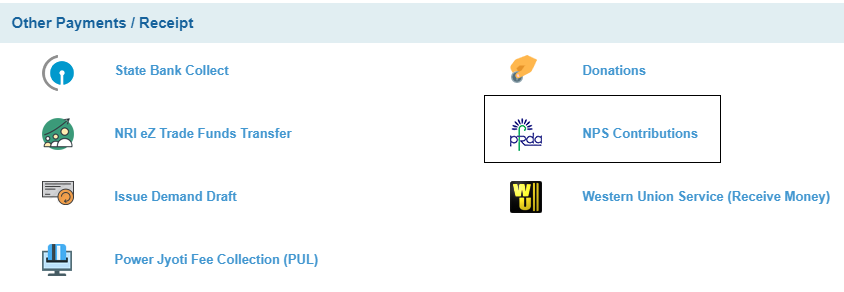
  • Click on the ‘Payments/Transfers’ Tab from Top navigation bar. You will be taken to the new page.
  • In this page, at the bottom you will find NPS Contribution option under ‘Other Payments/Receipt’.

NPS Online Payment SBI

  • If you have already added NPS beneficiary account, you will able to select PRAN and debit account for the payment.
  • If you are making payment for the first time, you need to add NPS Beneficiary account. You will get option of adding NPS beneficiary account in the similar tab. You need to enter your PRAN number for registration. You will be prompted to enter nick name for easy identification.

NPS beneficiary SBI

  • Next step is making selection of type of account. You will get drop down option, where you need to select between Tire-1 and Tire-2 account. You can make the contribution to both Tier-1 and Tier-2 account in a single payment. But note that your contribution in Tier-1 and Tier-2 will be treated as a different transaction. You will have to pay transaction charges for each of these transactions separately.
  • Once you are done with the selection press submit button and it will show NPS online payment detail page. Enter the amount and click on the confirm button to complete the payment process.
  • Your NPS online payment is completed. You will receive a confirmation message on the screen and also through SMS and email.

#Online NPS Payment via ICICI Bank

You can also make online NPS payment via ICICI Bank. The process is similar to SBI. You need to have net banking account of ICICI to use this facility. You also need to add NPS beneficiary to start contribution. The entire process of making online contribution to NPS account via ICICI is given below.

  • First sign into your ICICI Net Banking Account.
  • Click on Payments & Transfer and go to manage billers. Click on Register Now to register NPS account.
  • Here you need to click on Pension option. You will be taken to new page where you need to add National Pension System as new biller.
  • Enter nickname for the beneficiary, your PRAN and DOB as on the PRAN card. Accept the terms and condition and click on next.

NPS Online Payment ICICI

  • Preview the details you have entered and click submit if details are correct. Your beneficiary is will be added successfully. And you will be able to make NPS payments after 3 working days.
  • Once NPS beneficiary is added you can make payment by following on screen instructions.

#Offline NPS Payment

If you are not relying on online option of making NPS payment you can use offline option. The steps are given below.

  1. You need to visit the POP-SP and get NCIS form. This form can be downloaded from NPS NSDL website. Fill all the required details in NCIS form including PRAN, subscriber’s name and amount.
  2. You need to mention whether you are a government subscriber or not. Attach DD/Cheuqe copy in the fovor of ‘POP (POP name) collection account – NPS Trust”. If amount is exceeding Rs.50000 you need to attach photocopy of PAN card.
  3. Make sure that cheque is account payee. Please write your PRAN and mobile number at the backside of your cheque.
  4. Submit the form along with cheque to payment counter. After your contribution is successfully made, the POP-SP will give you payment acknowledgment slip. This slip contains the details of payment, transaction charges and invested amount.

Over to You –

Do you use any of the facility given above for making NPS online payment? Do share your views and experience in the comment section given below.

How to Pay Advance Tax Online? – Step by Step Process

It is very easy to pay Advance Tax Online. You just required Net Banking Facility to make an advance tax payment. Advance tax payment is required if your tax liability, after deducting prepaid taxes (TDS) is above Rs.10000. Short / Non-payment or deferment of payment of Advance Tax will result in the levy of interest.

What is Advance Tax?

Advance tax, also known as ‘pay-as-you-earn’ tax, is the income tax you pay in advance on your income throughout the financial year. Instead of paying taxes in one lump sum at the end of the year, advance tax requires taxpayers to pay it periodically, usually in quarterly installments.

It is mandatory to make e-payment of advance tax for all corporates and for the assesses whose accounts are required to be audited u/s 44 AB of the Income-tax Act. e-payment is convenient for taxpayers as it ensures correct credit.

Who needs to Pay Advance Tax?

Not sure if you fall under the advance tax net? Here’s a quick rundown:

  • Individuals: If your total tax liability exceeds ₹10,000 in a financial year after considering TDS, you’re required to pay advance tax.
  • Businesses: Companies, firms, and other entities with tax liabilities over ₹10,000 also need to pay advance tax.

If you are falling the category where you are liable to pay advance tax, follow the steps given below for e-payment of advance tax.

Now that we have a grasp of what advance tax entails, let’s delve into the steps to pay it online in India:

How to Pay Advance Tax Online? – Step by Step Process

Step 1: Calculate Your Estimated Income

The first step in paying advance tax is estimating your income for the financial year. Take into account all sources of income, including salaries, business profits, capital gains, and interest income.

Step 2: Calculate Your Tax Liability

Once you’ve estimated your income, calculate your tax liability using the applicable tax rates and deductions. Various online calculators and tools can assist you in this process.

Step 3: Determine Payment Due Dates

Advance tax payments are typically due in four installments throughout the financial year. Refer to the following schedule to determine the due dates:

  • 15th June: 15% of estimated tax
  • 15th September: 45% of estimated tax
  • 15th December: 75% of estimated tax
  • 15th March: 100% of estimated tax

Also Read –  Download Income Tax Calculator FY 2023-24 (AY 2024-25)

Step 4: Making Payment on Income Tax Website

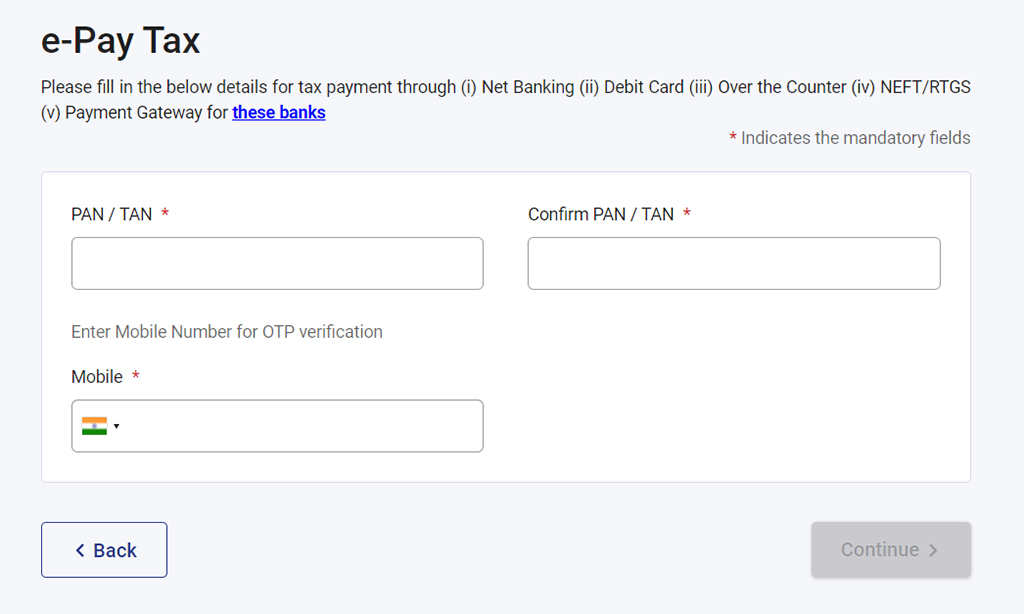
Advance Tax payment facility is available at Income Tax filing website. To make payment of advance tax online you need to visit Income tax website. On this website  you will find tab called as e-Pay Tax in the left menu.

epay tax advance tax

Now, login via entering PAN card. For Aadhaar authentication you need to enter your Mobile number. Once you enter the detail press continue button. OTP will be sent to your register mobile number. After entering OTP your profile would be successfully verified through mobile OTP.

After pressing continue button your would be redirected to page containing facility of tax payment where you need make selection from following.

Income Tax

  • Advance Tax (100)
  • Self Assessment Tax (300)
  • Tax on Distributed Income to Unit Holders (107)
  • Surtax (102)
  • Payment of Demand/Penalty/Interest etc.
  • Secondary Adjustment Tax under Section 92CE of Income-tax Act, 1961(110)
  • Accretion Tax under Section 115TD of Income-tax Act, 1961 (111)

Demand Payment as Regular Assessment Tax 

Equalisation Levy/ STT/ CTT

Other Payments
  • Wealth Tax
  • Fringe Benefit Tax
  • Banking Cash Transaction Tax
  • Interest Tax
  • Hotel Receipts Tax
  • Gift Tax
  • Estate Duty

e-pay-tax

Now, as you need to pay Advance Income tax, select income tax and make selection of assessment year and type of payment. Make sure to select “Advance Tax (100)’ under this head for advance tax payment.

Now enter tax amount, surcharge, cess, interest, penalty and other details. Now press continue button and you will taken to the page where you can make payment using (i) Net Banking (ii) Debit Card and (iii) Payment Gateway with specific banks.

On successful payment, you will receive Challan Receipt. This challan contains important information like BSR code, Challan number, Challan Date and Challan amount. You need to mention this detail while filing an income tax return. Please keep challan copy safe for future reference.

FAQs (Frequently Asked Questions)

1. Can I Pay Advance Tax Offline?

Yes, you can pay advance tax offline by visiting designated bank branches and filling out the necessary forms. However, paying online offers convenience and efficiency.

2. What Happens if I Miss an Advance Tax Installment?

Missing an advance tax installment may attract interest under Section 234B and 234C of the Income Tax Act. It’s advisable to pay any missed installments as soon as possible to avoid additional penalties.

3. Is Advance Tax Refundable?

Yes, if you’ve paid excess advance tax compared to your actual tax liability, you’re entitled to a refund. You can claim the refund while filing your income tax return.

Conclusion

Congratulations! You’ve now mastered the art of paying advance tax online in India. By following the steps outlined in this guide and staying informed about your tax obligations, you can navigate the taxation landscape with confidence. Remember, timely payment of advance tax not only helps you avoid penalties but also ensures smooth financial planning throughout the year. So, embrace the digital age, log in to the Income Tax Department’s portal, and stay ahead of the tax game! How to Pay Advance Tax Online in India?