Sukanya Samriddhi Account Yojana is one of the best Investment option for Girl Child. Sukanya Samriddhi scheme is predominantly launched as a part of “Beti Bachao Beti Padhao campaign” by the government of India. It’s not just a savings scheme; it’s a financial game-changer specifically designed to empower young girls and relieve parents of the financial burden of education or marriage expenses. But let’s be honest, managing investments and keeping track of numbers can be a pain, right? That’s where a Sukanya Samriddhi calculator swoops in to save the day.
Sukanya Samriddhi Account – Saving Scheme for Girl Child
Sukanya Samriddhi Yojana, launched by the Government of India in 2015 under the Beti Bachao Beti Padhao campaign, is a savings scheme aimed at providing a bright future for the girl child. It encourages parents to build a corpus for their daughter’s education, marriage, and other life events by making regular contributions to the scheme.
The main goals of Sukanya Samriddhi Yojana are dual: to empower girls and encourage long-term savings in Indian households. By participating in this program, parents can provide a financial safety net for their daughters’ future, guaranteeing access to education and opportunities.
Key Features of Sukanya Samriddhi Account
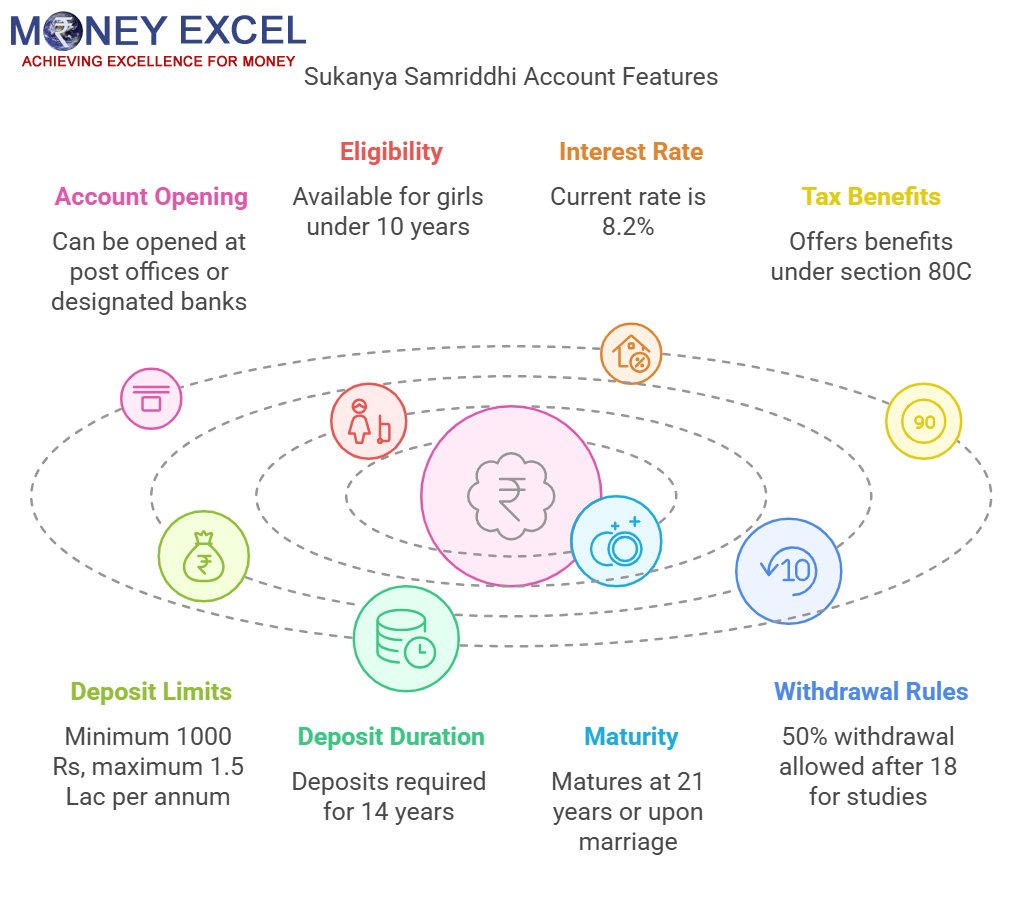
- Sukanya Samriddhi Account can be opened at the Post office or at designated bank branches.
- This account can be opened for girl child on her name by her parents.
- The age of the girl at the time of opening the account should not be more than 10 years.
- For the current financial year government has declared 8.2% interest (Jan-March 2024) on this scheme.
- Investment in this scheme will also give income tax benefits under section 80C.
- The minimum deposit amount under this scheme is 1000 Rs/- and the maximum is 1.5 Lac per annum.
- Money must be deposited for 14 years.
- The maturity of the account is 21 years from the date of opening of the account or as a girl child gets married whichever is earlier.
- Although a money deposit is not required from 14 years onwards government shall pay interest on this scheme up to 21 years (maturity).
- 50% withdrawal is allowed for the higher study of girl child after 18 years of age.
If you are looking for good returns with zero risk “Sukanya Samriddhi Account” is for you. This scheme offers tax-free maturity returns.
Make Your Money Work for You: Smart Investment Strategies
While the Sukanya Samriddhi Account ensures financial security for your child’s future, it’s equally important to think about the next step—how to make those savings grow even further. With inflation steadily eroding the value of money, simply keeping funds idle is not an ideal approach. Instead, reinvesting the maturity amount wisely can secure long-term financial stability.
One effective way to do this is by diversifying investments into low-risk and high-return opportunities. Many parents choose to reinvest a portion of the matured funds into government bonds, mutual funds, or even online FX broker platforms, where they can explore currency trading as a means of passive income. A well-balanced portfolio can help counteract the effects of inflation and maintain the real value of your money over time.
By planning ahead and leveraging the right investment opportunities, you can ensure that your child’s future remains financially secure even beyond the benefits of the Sukanya Samriddhi scheme.
Sukanya Samriddhi Account – Calculator
Imagine you’re baking a cake. You have all the ingredients, but without a recipe, you might end up with a disaster instead of a dessert. A Sukanya Samriddhi calculator works like your financial recipe book.
This digital tool helps you figure out:
- Maturity Amount: How much you’ll receive at the end of the tenure.
- Total Investment: The sum of all your yearly deposits.
- Total Interest Earned: The cherry on top—your hard-earned returns.
By inputting details like the deposit amount, the girl child’s age, and the interest rate, the calculator churns out these figures in seconds.
Assumptions: –
- Sukanya Samriddhi Account is opened on the birth of girl child. Age -1 Year.
- Yearly contribution is made at the beginning of the financial year in the month of April every year.
- In this calculator you need to change interest rate which is released by the government time to time.
- No withdrawal is made from Sukanya Samriddhi Account throughout 21 years
- It is not mandatory to contribute fix amount in this account, although for illustration fixed contribution is taken
You can download this calculator from here.

A New Calculator for the Sukanya Samriddhi Account is added based on the request of readers. Features of the New Calculator are given below.
- Option to select Interest rate every quarter.
- Option to input investment amount for every month or every year.
This New calculator will give exact information about the maturity value of the Sukanya Samriddhi Account.
Also Read – How to know your Gratuity Benefits – Calculator Download
Benefits of Using the Sukanya Samriddhi Calculator
1. Saves Time and Effort
Why bother with complicated math when a calculator can do the heavy lifting? It’s like having a personal financial assistant at your fingertips.
2. Accuracy You Can Count On
Even the best of us can slip up when calculating interest manually. With a Sukanya Samriddhi calculator, accuracy is guaranteed.
3. Informed Decision-Making
Planning to increase your yearly deposit? The calculator shows how it impacts your maturity value. It’s like a crystal ball for your savings!
4. User-Friendly Interface
Most calculators are super easy to use. Even if you’re not tech-savvy, you’ll get the hang of it in no time.
How to Use the Calculator After Downloading
Now that you’ve got your calculator, here’s a quick guide to using it:
- Input Key Details:
- Start year of investment
- Annual deposit amount
- Girl child’s age
- Interest rate (as per the current SSY rate, updated quarterly by the government)
- View Results:
The calculator will instantly display your:
- Total deposits
- Interest earned
- Maturity value
- Tweak Inputs:
Experiment with different deposit amounts or tenures to see how your savings grow.
How to Open SSY Account?
Opening an SSY account is a straightforward process. Here’s a step-by-step guide:
- Visit a designated bank or post office authorized to open SSY accounts.
- Fill out the Sukanya Samriddhi Yojana account opening form.
- Submit necessary documents such as the girl child’s birth certificate, identity proof, and address proof.
- Make the initial deposit amount as specified by the bank or post office.
- Upon verification of documents, the SSY account will be opened, and a passbook will be issued.
Who can open this account?
Sukanya Samriddhi Account can be opened by parents or legal guardians of girl child up to 10 years of age. You can open this account if your daughter is born on or after December 2, 2003.
Documents required for Sukanya Samriddhi Account
- Birth certificate of girl child
- Address proof
- Identity proof, Residence proof
- Two photographs of legal guardian
NRI Can open this account?
Sukanya Samriddhi Account (SSA) in India are typically restricted to Indian residents. Non-Resident Indians (NRIs) usually aren’t eligible to open an SSA for their daughters because the scheme is primarily designed to benefit Indian resident families.
Online Money Deposit in Sukanya Samriddhi Account is allowed?
Yes, Online money deposits can be made into a Sukanya Samriddhi Account (SSA) as per the rules. Many banks and financial institutions with SSAs offer online banking, allowing for easy deposits into the account.
Usually, parents or guardians can conveniently make regular contributions to their daughter’s Sukanya Samriddhi Account by transferring funds online from their bank account.
However, it’s essential to check with your specific bank or financial institution regarding their online banking services and procedures for depositing funds into a Sukanya Samriddhi Account, as processes may vary slightly between different banks.
Note :- Recently interest rate applicable on Sukanya Samriddhi Account is revised by the government. The new interest rate on SSA will be 8.2 %(Oct to Dec -2024).
To download Sukanya Samriddhi Account application from CLICK HERE
Also Read – Sukanya Smariddhi Account – Saving Scheme for Girl Child
Where to Open Sukanya Samriddhi Account?
This account can be opened at the post office or other authorized banks.RBI released circular authorizing 28 banks to open SSA. You can open SSA account in to bank which are authorized to open PPF account. List of Bank authorized to Open Sukanya Samriddhi Account is given below.
- State Bank of India
- State Bank of Patiala
- State Bank of Bikaner & Jaipur
- State Bank of Travancore
- State Bank of Hyderabad
- State Bank of Mysore
- Andhra Bank
- Allahabad Bank
- Bank of Baroda
- Bank of India
- Punjab & Sind Bank
- Bank of Maharashtra
- Canara Bank
- Central Bank of India
- Corporation Bank
- Dena Bank
- Indian Bank
- Indian Overseas Bank
- Punjab National Bank
- Syndicate Bank
- UCO Bank
- Oriental Bank of Commerce
- Union Bank of India
- United Bank of India
- Vijaya Bank
- Axis Bank Ltd.
- ICICI Bank Ltd.
- IDBI Bank Ltd.
Comparison of SSY with Other Schemes
Difference between Sukanya Samriddhi Account, Public Provident Fund and Fixed Deposit
|
Sukanya Samriddhi Account (SSA) |
Public Provident Fund (PPF) |
Fixed Deposit (FD) |
| For |
For Girl Child Indian Citizen |
For Individual Indian Citizen |
For Individual Indian Citizen |
| Age Limit |
From Birth Up to 10 Years |
No age limit. |
No age limit. |
| Where to open |
Post office and Authorized Banks |
Post office and Authorized Banks |
All Banks |
| Number of Account |
One Account per Girl Child |
Each Individual can hold only one account in his name. |
No limit. |
| Minimum Contribution |
Rs.1,000 |
Rs.500 |
Rs.500 |
| Maximum Contribution |
Rs.1.5 lakhs in all accounts. |
Rs.1.5 lakhs in all accounts. |
No limit. |
| Interest Rates |
8.60% for fiscal year 2016-17.(First Quarter) |
8.10% per annum for fiscal year 2016-17.(First Quarter) |
7.25% to 9% |
| Tax Benefit on the Contribution |
Contributed Amount will be deductible u/s 80C. |
Contributed Amount will be deductible u/s 80C. |
No Tax Benefit |
| Tax Benefit on the interest earned |
Tax Free |
Tax Free |
No Tax Benefit |
| Time Period of contribution |
14 Years from date of opening account |
Minimum 15 years and then in blocks of 5 years. |
One Time |
| Maturity |
21 years from the date of opening of account. |
15 years from the fiscal year of opening of account. |
Investor Defined at the time of Investment |
| Penalty |
Rs.50 per year if minimum contribution is not made. |
Rs.50 per year if minimum contribution is not made. |
NA |
| Mode of Deposit |
Cash or Demand Draft or Cheque |
Cash or Demand Draft or Cheque |
Cash or Demand Draft or Cheque |
| Premature Withdrawal |
Allowed up to 50% for the girl’s higher education and marriage after she attains 18 years of age |
No premature withdrawal allowed except in case of death of Investor |
Premature Withdrawal allowed – Penalty may be applicable |
| Loan |
No loan can be taken on the SSA balance. |
Loan can be taken from the third year of opening of account to the sixth year. |
Loan can be taken |
| Taxation on Maturity |
No Tax |
No Tax |
Tax as per applicable Slab |
| Calculator |
SSA Calculator |
PPF Calculator |
– |
From the above comparison, we can clearly say that the Sukanya Samriddhi Account and PPF is one of the Best Investment Options for Indians.
Hope you like this post and will open a Sukanya Samriddhi Account.
As this is a Government of India scheme, you are advised to visit www.nsiindia.gov.in for the latest information and updates.
Conclusion
The Sukanya Samriddhi Yojana is more than just a savings scheme; it’s a powerful tool for securing your daughter’s future while enjoying excellent returns and tax benefits. By using a Sukanya Samriddhi calculator, you can simplify the planning process, gain clarity on your financial goals, and ensure you’re on the right track.
So, what are you waiting for? Download a Sukanya Samriddhi calculator today and take the first step towards a financially secure future for your daughter. Remember, every rupee you invest today will pave the way for her dreams tomorrow.