
Blog Page 307

How to change Mobile Number in EPF UAN Account?

You can easily change or update Mobile Number and E-mail address in EPF UAN Account using Unified Portal. However, many people are not aware of this facility. Recently, one of blog reader asked a question in the comment section that “I forgot my password of UAN and I changed my mobile number also. How to Login to the Unified portal or How to update my mobile number? Well, it is easy to change mobile number on EPF UAN Portal. You just need your UAN number that’s it!

Before sharing an actual method of changing and updating mobile number, let us take a look at what are the benefits of registering mobile number with your EPF UAN Account.

  • To avail balance detail of EPF via SMS.
  • To complete online transfer claim request.
  • To apply for online EPF Withdrawal

In short, it is necessary to update your EPF UAN account with the latest mobile number used by you. If you are struggling to update your Mobile number or E-mail ID in EPF UAN account this post is for you. In this post, I will share two simple methods to change mobile number in EPF account using unified member portal.

Also Read – How to update change EPF Nomination online with UAN?

Change Mobile Number in EPF UAN Online without Password

If you have forgotten your UAN password and you want to change your mobile number follow the process given below.

  • Visit Unified Member Portal.
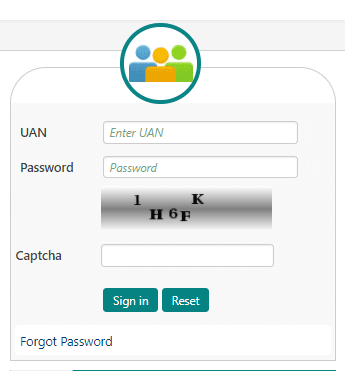
  • On the right-hand side, you will find login menu.
  • Click on Forgot Password link.

forgot password UAN EPF

  • You will be redirected to the page where you need to provide your UAN number along with Captcha. After inputting this detail click on Submit button.
  • The system will display current mobile number registered with UAN account. In case you want to change or update this mobile number click on “No” button given besides “Do you wish to send OTP on the above mobile number?” message.
  • The system will prompt you to input basic information such as your name, date of birth and gender.
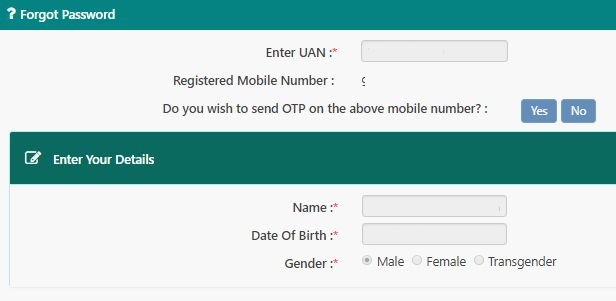
forgot password change mobile

  • After providing information click on Verify Button. It will now check EPFO database about the correctness of the information provided by you. If the information is incorrect it will simply say that above information is not matching with the information available in the system. Kindly contact EPFO office.
  • If information matches with EPF database it will further ask you to validate against AADHAAR or PAN.
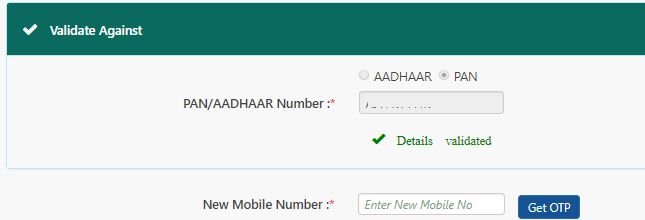
validate mobile epf uan

  • You need to select any one option and provide information as per selection. After providing correct information click on Verify button. If details are validated you will be asked to input your mobile number to get OTP. Enter the OTP to update your mobile number at EPF UAN.

Above process is very lengthy and tedious as multiple validation points are involved. You need to provide correct information at every stage. (As per EPFO database). Incorrect information at any point of time means difficulty in updating mobile number.

In addition to that above process will work only if KYC detail of the member is in place. The second method to change the mobile number at EPF portal is very easy. However, in second method you will need EPF UAN login ID and password.

Also Read – How to update KYC EPF UAN Online?

How to change or Update Mobile Number in EPF UAN Online?

If EPF UAN password is known to you follow the steps given below for updating mobile number and e-mail address.

  • Visit Unified member portal.
  • Login using UAN and Password to the unified portal.
  • Click on Manage >> Contact Details from the top navigation menu.
  • You will be diverted to the page where your registered mobile number and E-mail ID will be displayed.
  • In order to change mobile number click on “Change Mobile Number” and enter your New Mobile Number.
  • Click on “Get Authorization Pin”. OTP will be sent to your new mobile number. Enter OTP and your mobile number will changed.
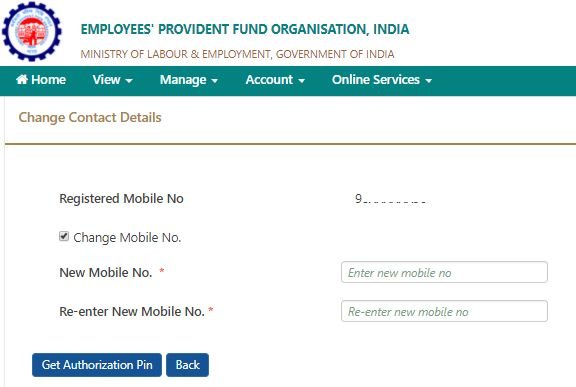
change mobile number epf

  • In a similar way, you can also change your E-mail ID. You just need to enter your new e-mail address and click on “Get Authorization Pin”.OTP will be sent to your e-mail address. Once you input the OTP you will be able to change e-mail address.

Also Read – Online EPF withdrawal Claim Submission Process

You can also change the mobile number by going to View >> Profile from the top navigation menu.

In profile, you will be able to see member details. If mobile number mentioned in your profile detail is incorrect, click on “Change” link given in front of the mobile number.
Top up Loan Vs Personal Loan – What should you choose and Why?

What is Top Up Loan? Why should you consider Top up Loan? Let’s take a look. People generally opt for a personal loan to fulfill their cash requirement in an emergency. It is quick and easy loan option nowadays. However, before taking any loan one must understand, which loan is best for them?

My friend had purchased a flat by taking a home loan before 3 years. He started paying EMI’s for the same. After 3 years he got an additional requirement of 3 Lakh for his daughter’s marriage. He could not manage cash and the only option left to him is taking another loan. He approached the bank from where he has taken a home loan. The bank manager gave him two options (1) Personal loan (2) Top up Loan. He is confused and looking for an answer which one he should take a personal loan or top up loan? If you are in a similar situation here is a quick guide explaining about Top up Loan and Personal Loan.

Also Read – 5 Best Banks for Personal Loan in India

What is Top up Loan?

Top-Up Loan as the name suggests it is a loan given on the Top of another loan – Home Loan. That’s why it is also known as a Top Up Home Loan. Top-Up Home loan is offered to existing home loan customers. Almost all banks including Non-Banking Finance companies (NFBCs) offers Top up Loan. Terms condition, interest rate and tenure of this loan differ from bank to bank. You need to have a very good credit history in order to take this loan. There is a common misconception that Top up Home loan is given only for house renovation or for additional construction. However, it is not true. Most of the bank offers Top up loans which can be used for any purpose including medical expense, marriage, business expense, child’s education etc.

Eligibility Conditions for Top up Loan

  • You should be an existing home loan customer of the bank or NFBC.
  • You should be holding very good repayment record for few years.
  • You should not have exhausted your home loan limit.
  • Your Credit score should be good.

If above conditions are satisfied banks generally sanction top-up home loan in maximum 2 days’ time.

Note – Eligibility conditions for this type of loan may vary from bank to bank. You should talk to your bank/NFBC to find out further details.

Key Features and Benefits of Top up Loan

No Additional Collateral 

Top Up Home loans does not require any type of additional collateral. You need not provide any documents/evidence of holding an additional asset for availing this loan. Your home loan agreement/paper will act as collateral.

Interest Rate

 The interest rates charged on Top-Up Home Loans are 1% – 3% higher than a home loan interest rate. This means you will get a top-up home loan at the interest rate of 11% -14%. At first glance, this cost seems to be high but if we compare it with a personal loan it is low.

Loan Amount 

 The loan amount in the case of a top-up home loan will be limited to your sanction home loan amount/outstanding balance. In some cases, a bank may give additional loan amount sanction, it all depends upon your credit history and property rates where you have purchased a property.  The approval amount will be higher if a top-up loan is applied after 3-4 years of availing home loan.

Loan Tenure

The tenure of top-up loans is 10 years or 15 years. It can go up to 20 years based on your existing home loan tenure.

Approval

It generally takes 2 days to get an approval of this loan. Banks usually check the repayment history and repayment capacity of the borrower before approving the loan.

Purpose

Some banks restrict top-up home loan for home extension only. However, most of the bank has removed this restriction. You can avail top-up home loan for any purpose like children education, medical emergency, home renovation, marriage, business expense etc.

Tax Benefit 

You can avail tax benefits provided you have used top-up loan amount for renovation, acquisition or construction of the existing home.

Also Read – 20 Types of Loans in India

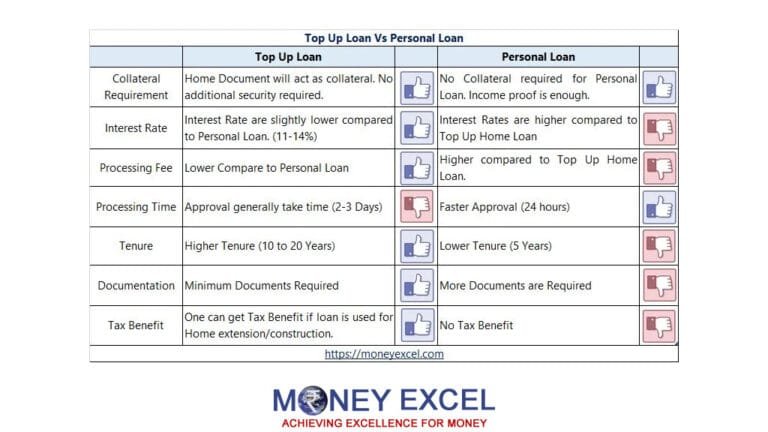
Top-Up Loan Vs Personal Loan

After understanding the concept of Top Up Home loan. Let’s compare Top Up Loan and Personal Loans.

personal loan vs top up loan india

What should you choose?

I hope by now you must have got a fair understanding of top-up loans and personal loans. Top up Loan offers multiple advantages compared to personal loans. If you have an existing home loan with a lender and a choice is given to you between a personal loan and top up loan you must select top-up loan as it offers benefits like lower interest rate, higher tenure, lower EMI and minimum documentation.

If you don’t have a home loan you can think of taking a personal loan, gold loan or loan against a fixed deposit. Make sure to do proper research before taking any loan.

How to Submit Form 15G Form 15H Online – ICICI, SBI Bank

Form 15G and Form 15H can be submitted online with a click of a button. No physical visit to bank is required for submitting Form 15G or Form 15H. You must be aware that TDS is applicable on fixed deposit interest income.

If your income is less than basic exempted limit you can submit the Form 15G or Form 15H to save TDS on fixed deposit interest. Big banks like ICICI and SBI offers this online facility to submit Form 15G and 15H. You just need internet banking facility and internet connection to submit Form 15H or Form 15G online.

PAN card is mandatory for the submission of these forms. Form 15G and Form.Form 15G and Form 15H are valid for one financial year.You need to submit this form every year before the start of the next financial year. This is to ensure that bank does not deduct TDS on your interest income.

For FY 2020-21, the facility of submitting Form 15G and 15H is extended by the government due to COVID 19 Virus. You can now submit these forms up to 30th June 2020 instead of 31st March 2020.

If you have opened fixed deposit at SBI or ICICI, you can use this guide, which will help you to submit Form 15G or 15 H online.

What is Form 15G, Form 15H?

Form 15G and Form 15H are forms helps a person to avoid TDS in case ones tax liability is NIL.

  • Form 15G is for Individual with age less than 60 years and Form 15H is for senior citizens.
  • Depositor having interest income above basic income tax slab will not be able to submit the 15G/15H form.
  • This form needs to be submitted every year. This means in last financial year if you have submitted this form you need to submit it again in a current financial year.
  • This form needs to be submitted to every bank or company from where you have taken a fixed deposit and interest income is above Rs.10000 in a year.
  • Any type of wrong declaration using form leads to penalty including imprisonment.

Also Read – Download Form 15G Form 15 H

Information about when to use which form is given in the following table –

By Whom Age Form Type Basic Exemption Limit (Rs.)
Individual Below 60 years 15G 2,50,000
Senior Citizen 60 years or above at any time during the year 15H 3,00,000
Super Senior Citizen 80 years or above at any time during the year. 15H 5,00,000
Other than Individual Not Applicable 15G 2,50,000

How to submit Form 15G Online at ICICI Bank?

  • Log in to ICICI Bank Internet Banking with your User ID and Password.
  • From Top navigation menu Select “Payments and Transfer” and click on Tax Centre.
  • You will be taken to the page where you can see various options like TDS Certificate, View Form 26AS, Form 15G/H etc. Click on update button given under Form 15G/H
  • Fill or select necessary details like account number, status etc. Now input your estimated total income including the estimated income earned on fixed deposit.
  • Also, provide details such as No of forms filled including forms given at other places.
  • Click on Submit button.
  • Recheck the information given on confirmation page and click on submit button.
  • Download Acknowledgment for future reference. Also, note down service request number. It will help you to check the status of your service request.

Also Read – File Form 15G and Form 15H Online and Save TDS

How to submit Form 15G Online at SBI?

  • First Login to SBI net banking portal using your net banking credentials.
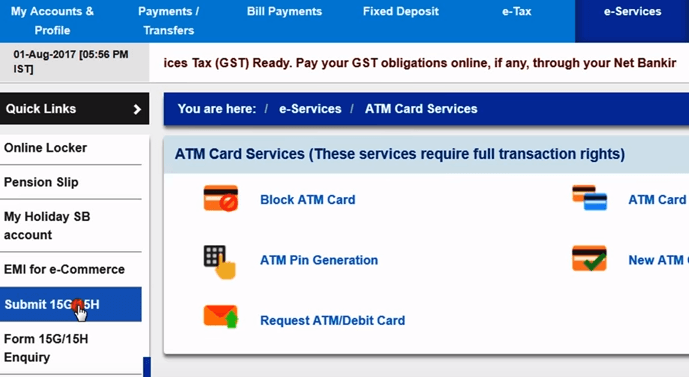
  • From top navigation, select “e-Services” option. From left side navigation you will be able to see Submit 15G/H option click on that.

SBI Form 15G Form 15H

  • Select Form 15G or Form 15H based on applicable condition.
  • Select CIF number and click on submit button. System will show branch selection option. Select branch and press submit.
  • Now the form will open asking you information like Name, Assessment Year, Estimated total income, Total number of form filed. Provide appropriate information, select declaration acceptance and click on Submit Button.
  • Form 15G/H will be generated for verification. Click on confirm. You will be prompted to provide High-security password received on registered mobile as SMS.
  • Provide the password and click on confirm button. That’s it your Form 15G/H is generated and submitted to the bank. Keep Download copy of this form as a reference.

I hope now you are clear about the process of submitting Form 15G or Form 15H online. If you have any query feel free to post it in the comment section.