

If you are a salaried employee in India, there is a good chance that a portion of your salary gets deducted every month and goes into your Employees’ Provident Fund (EPF) account. Your employer adds a matching contribution as well. Over the years, this money accumulates — often becoming a substantial sum — and earns interest declared by the EPFO (Employees’ Provident Fund Organisation) every year.
This fund acts like a safety net for your retirement. However, life does not always go in a straight line. You might lose a job, face a medical emergency, plan to buy a house, or need to fund your child’s education. The good news is that EPFO allows you to withdraw this money — either fully or partially — depending on your situation.
The even better news: you can now do most of this online, from the comfort of your home, without needing your employer’s signature for most claims.
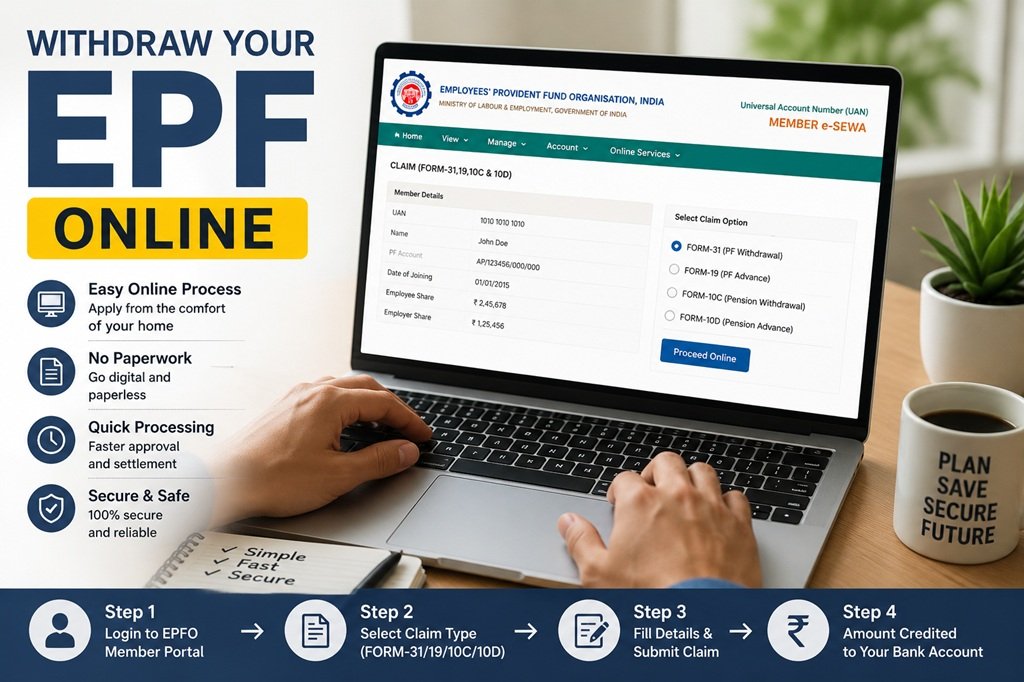
Types of PF Withdrawal
| Withdrawal Type | Form Required | Processing Time | Employer Approval? |
| Full PF Settlement | Form 19 | 3 to 5 working days | Not Required |
| Partial Advance (PF) | Form 31 | 7 to 10 working days | Not Required |
| Pension Withdrawal | Form 10C | 7 to 20 working days | Not Required |
Who Can Withdraw PF Online?
Before you begin, make sure you meet all of the following conditions. If even one is missing, your claim may get rejected.
- Your UAN (Universal Account Number) must be activated.
- Your Aadhaar and PAN must be linked and verified on the UAN portal.
- Your bank account must be seeded (linked) with your UAN.
- Your mobile number must be the same one linked to your Aadhaar — you will receive an OTP on it.
- You must have updated your Date of Exit in the EPFO portal (not required for partial advance while employed).
- You meet the eligibility condition: retired, unemployed for 2+ months, or eligible for a specific partial withdrawal.
Important: If your name in EPFO records does not exactly match your Aadhaar name, your claim will be rejected. Make sure to fix this before applying.
Documents and Things to Check Before You Apply
There is no physical document upload required for most online claims. However, you must make sure the following are in order — think of it as a checklist before you press ‘Submit’.
- UAN Activation and KYC
Your UAN must be active and your KYC (Aadhaar + PAN) must be verified. Log in to the UAN portal and check under Manage > KYC to see if your Aadhaar and PAN show a green ‘Verified’ status.
- Bank Account Details
Your bank account IFSC code and account number must be correctly linked. Even a single digit error can cause the money to bounce back. Double-check this before applying.
- Date of Exit
If you are applying for a full settlement (Form 19) or pension withdrawal (Form 10C), your Date of Exit must be updated. This is the date you officially left your last employer. If it is not updated, you cannot proceed. You may need to ask your previous employer to update it, or raise a grievance with EPFO.
- No Overlapping Service Dates
Check your Service History in the portal. If two jobs show overlapping dates — even by one day — your claim may get stuck. Contact your former employers to fix any such discrepancy.
How to Withdraw PF Online: 8 Simple Steps
Follow these steps carefully. The entire process takes about 10 to 15 minutes if everything is in order.
- Go to the UAN Member Portal at unifiedportal-mem.epfindia.gov.in. Log in using your 12-digit UAN and password.
- Once logged in, click on ‘Manage’ in the top menu and then click ‘KYC’. Verify that your Aadhaar, PAN, and bank account are showing as ‘Verified’ (green tick). If anything is unverified, fix it first.
- Go to ‘Online Services’ in the top menu and select ‘Claim (Form-31, 19, 10C & 10D)’.
- A page will appear showing your basic member details. At the bottom, enter the last 4 digits of your bank account number and click ‘Verify’.
- A certificate of undertaking will appear on screen. Read it and click ‘Yes’ to proceed.
- Click the button that says ‘Proceed for Online Claim’.
- You will now see a dropdown menu asking you to select the type of claim. Choose the one that applies to your situation: Form 31 if you are still employed and need a partial advance, Form 19 if you have left your job and want to settle your full PF balance, or Form 10C if you have left your job and want to withdraw your pension (EPS) amount.
- Tick the declaration checkbox at the bottom of the page. An OTP will be sent to the mobile number linked to your Aadhaar. Enter that OTP and click ‘Submit’.
That is it! Your claim is submitted. You can track its status on the same portal under ‘Online Services > Track Claim Status’.
How to Withdraw PF Using the UMANG App
If you prefer using your phone instead of a computer, you can do the entire process through the UMANG app. UMANG (Unified Mobile Application for New-age Governance) is a government app available on both Android and iOS.
- Open the UMANG app and log in with your registered mobile number.
- In the search bar, type ‘EPFO’ and open the EPFO services section.
- Tap on ‘Raise Claim’ under the employee services.
- Enter your UAN and verify your identity using the OTP sent to your Aadhaar-linked mobile number.
- Choose the type of claim — Full Settlement, Partial Advance, or Pension Withdrawal.
- Verify your bank account details shown on screen.
- Upload any supporting documents if prompted (for some advance types, you may need a scanned copy of a relevant certificate).
- Submit the claim and note down the reference number for tracking.
How to Withdraw PF Offline
If you are unable to complete the process online — perhaps your Aadhaar is not linked yet, or your mobile number is different — you can still withdraw PF by visiting your regional EPFO office.
Option 1: Composite Claim Form (Aadhaar)
Use this form if your Aadhaar and bank account are linked on the UAN portal. Download it from the EPFO website, fill it in, and submit it to the EPFO office that handles your region. You do not need your employer’s signature in this case.
Option 2: Composite Claim Form (Non-Aadhaar)
If your Aadhaar is not linked, download this version of the form instead. In this case, you will need your employer’s attestation (signature and stamp) before submitting it to the EPFO office.
Tip: Since 2017, EPFO allows self-certification for partial withdrawals. You no longer need multiple certificates or letters from your employer to explain your reason for withdrawal. A simple declaration is enough.
Types of PF Withdrawal
- Full Withdrawal (Complete Settlement)
You can withdraw 100% of your EPF balance only under two conditions: retirement (at age 58 or above) or unemployment. If you have been unemployed for at least 2 months, you can withdraw your entire PF amount. During the waiting period, you can still withdraw 75% immediately after losing your job.
| Situation | How Much Can You Withdraw? |
| Unemployed for less than 2 months | 75% of your PF balance |
| Unemployed for 2 or more months | 100% of your PF balance |
| Retired (age 58+) | 100% of your PF balance |
- Partial Withdrawal (Advance)
You do not need to resign or retire to access your PF. EPFO allows partial withdrawals for specific life needs. Here is what you need to know:
| Purpose | Maximum Amount | Service Required | Key Condition |
| Medical Emergency | Employee’s share + interest or 6 months’ wages (whichever is less) | No minimum | For self or family member |
| Child’s Education | Up to 50% of employee’s share (max 3 times) | 7 years | Children’s education after Class 10 |
| Wedding | Up to 50% of employee’s share (max 3 times) | 7 years | For self, sibling, or child’s marriage |
| House Purchase | Up to 90% of total balance | 5 years | Property in your or spouse’s name |
| Home Renovation | 12 times monthly wages | 5 years | Can only be claimed once |
| Pre-retirement | 90% of total balance | Not applicable | Must be 54+ years old or within 1 year of retirement |
- Pension (EPS) Withdrawal Rules
Your EPF contributions are split into two parts: the actual Provident Fund (EPF) and the Employees’ Pension Scheme (EPS). The pension part follows different rules:
- Less than 6 months of service: You cannot withdraw pension money at all.
- 6 months to 9.5 years of service: You can withdraw the full pension amount using Form 10C.
- More than 9.5 years of service: You are not allowed to withdraw pension money. Instead, you become eligible for a monthly pension when you reach the age of 58.
Will Your EPF Withdrawal Be Taxed?
This is where many people get confused. The tax treatment of your EPF withdrawal depends mainly on how long you have worked in total (across all employers where EPF contributions were made).
| Your Total Service Period | Withdrawal Amount | Tax Treatment |
| 5 years or more | Any amount | 100% Tax-Free |
| Less than 5 years | Below Rs. 50,000 | No TDS deducted |
| Less than 5 years | Rs. 50,000 or more (with PAN linked) | 10% TDS deducted |
| Less than 5 years | Rs. 50,000 or more (without PAN) | 30% TDS deducted |
Pro Tip: If you have worked for less than 5 years and your total income for the year is below the taxable limit (currently Rs. 2.5 lakh under the old regime or Rs. 3 lakh under the new regime), you can submit Form 15G (for people below 60) or Form 15H (for senior citizens) to avoid TDS deduction altogether.
Also remember: if you change jobs and transfer your PF instead of withdrawing it, your service period is counted continuously. So if you worked 3 years at Company A and transferred your PF to Company B where you work for another 3 years, your total service is 6 years — making your withdrawal tax-free.
Why Do PF Claims Get Rejected?
A rejected claim is frustrating. Here are the most common reasons — and what you can do about each.
- Your name in EPFO records is different from your Aadhaar. Even a small difference like ‘Raj Kumar’ vs ‘Rajkumar’ can cause rejection. Fix it by submitting a Joint Declaration Form signed by you and your employer. Name Mismatch:
- The cancelled cheque you uploaded was blurry or the bank name, account number, or IFSC code was not readable. Upload a clear, flat scan or photo. Unclear Cheque Image:
- You selected Form 31 (advance while employed) but mentioned that you are ‘out of service’. Or you selected the wrong reason in the dropdown. Re-read the form options carefully. Wrong Form Selected:
- The money was processed by EPFO but bounced back because your bank account was inactive, frozen, or closed. Activate your account or update your bank details. Dormant or Frozen Bank Account:
- For full settlement claims, EPFO will reject the claim if your Date of Exit is blank. Ask your previous employer to update it — or contact EPFO if your employer is unresponsive. Date of Exit Not Updated:
EPFO 3.0: What’s New in 2026?
EPFO has launched a major upgrade to how members can access their money. Under the EPFO 3.0 framework, several new features have been introduced:
- ATM-based PF Withdrawal: In the coming months, you will be able to withdraw PF money directly from an ATM, similar to how you use a debit card. A special ATM card linked to your PF account will be issued.
- UPI-based Withdrawal: You can transfer your PF advances directly to your UPI ID, making the process even faster.
- Higher Auto-Settlement Limit: The limit for automatic settlement has been raised to Rs. 5 lakh. This means claims below this amount are processed automatically without manual intervention.
- No Employer Approval: For most claims, you no longer need your employer to approve or sign off. The system works entirely through Aadhaar-based OTP verification.
- Minimum Balance Rule: You must always maintain at least 25% of your PF balance in the account, even after withdrawals.
How to Track Your PF Claim Status
Once your claim is submitted, here is how you can check where it stands:
- Log in to the UAN Member Portal.
- Click on ‘Online Services’ in the top menu.
- Select ‘Track Claim Status’.
- Your claim will show one of these statuses: Under Process (EPFO is reviewing it), Settled (money has been transferred to your bank), Rejected (your claim was denied — check the reason), or Returned (money was sent but bounced back).
Typically, online claims are processed within 3 to 20 working days depending on the type of claim. If your claim is stuck for more than 20 days, you can raise a grievance on the EPFiGMS portal (epfigms.gov.in).
EPFO Contact Details
Need help? Here is how to reach EPFO:
- Toll-Free Helpline: Call 14470 (available on working days during office hours)
- Missed Call Service: Give a missed call to 9966044425 from your registered mobile number to get your EPF balance details.
- SMS Balance Check: Send the message EPFOHO UAN to 7738299899 from your registered mobile number.
- Email Support: Write to employeefeedback@epfindia.gov.in for queries or complaints.
- Grievance Portal: Visit epfigms.gov.in to register a formal complaint if your issue is not resolved.
Final Thoughts
Withdrawing your EPF is much simpler than it used to be. A few years ago, you needed physical forms, employer signatures, and multiple visits to the EPFO office. Today, if your UAN is activated and your KYC is in order, you can complete the entire process in under 15 minutes — right from your phone or laptop.
The most important thing to do right now, even if you are not planning to withdraw, is to make sure your UAN is active, your Aadhaar and PAN are linked, and your bank account is correctly updated. That way, whenever you need the money, you are ready.

