Gold Price – Gold has historically represented wealth and prosperity, particularly in India, where it is vital to culture, tradition, and investments. Archaeological discoveries indicate that gold was highly valued in ancient India, utilized not just for making jewelry but also for commerce and as a medium of exchange. It was greatly esteemed for its clarity and untainted quality. Gold has been a vital part of India’s heritage for centuries, from traditional jewelry to religious rituals. It is a reality that families in India together possess more than 11% of the world’s total gold.
Gold isn’t just an investment in India; it’s an emotion. From weddings to festivals, gold plays a central role in Indian culture. But beyond its cultural significance, gold is also a reliable financial asset. It’s no wonder that India is one of the largest consumers of gold in the world.
Have you ever considered how the price of gold has evolved over the years and what lies ahead for it? Let’s thoroughly examine the historical trends of gold prices in India and investigate expert forecasts for what lies ahead.
Gold Price History – 75 Years
| Year |
Price (24 carat per 10 grams) |
| 1947 |
₹88.62 |
| 1948 |
₹95.87 |
| 1949 |
₹94.17 |
| 1950 |
₹99.18 |
| 1951 |
₹98.05 |
| 1952 |
₹76.81 |
| 1953 |
₹73.06 |
| 1954 |
₹77.75 |
| 1955 |
₹79.18 |
| 1956 |
₹90.81 |
| 1957 |
₹90.62 |
| 1958 |
₹95.38 |
| 1959 |
₹102.56 |
| 1960 |
₹111.87 |
| 1961 |
₹119.35 |
| 1962 |
₹119.75 |
| 1963 |
₹93 |
| 1964 |
₹63.25 |
| 1965 |
₹71.75 |
| 1966 |
₹83.75 |
| 1967 |
₹102.50 |
| 1968 |
₹162.00 |
| 1969 |
₹176.00 |
| 1970 |
₹184.00 |
| 1971 |
₹193.00 |
| 1972 |
₹202.00 |
| 1973 |
₹278.50 |
| 1974 |
₹506.00 |
| 1975 |
₹540.00 |
| 1976 |
₹432.00 |
| 1977 |
₹486.00 |
| 1978 |
₹685.00 |
| 1979 |
₹937.00 |
| 1980 |
₹1,330.00 |
| 1981 |
₹1670.00 |
| 1982 |
₹1,645.00 |
| 1983 |
₹1,800.00 |
| 1984 |
₹1,970.00 |
| 1985 |
₹2,130.00 |
| 1986 |
₹2,140.00 |
| 1987 |
₹2,570.00 |
| 1988 |
₹3,130.00 |
| 1989 |
₹3,140.00 |
| 1990 |
₹3,200.00 |
| 1991 |
₹3,466.00 |
| 1992 |
₹4,334.00 |
| 1993 |
₹4,140.00 |
| 1994 |
₹4,598.00 |
| 1995 |
₹4,680.00 |
| 1996 |
₹5,160.00 |
| 1997 |
₹4,725.00 |
| 1998 |
₹4,045.00 |
| 1999 |
₹4,234.00 |
| 2000 |
₹4,400.00 |
| 2001 |
₹4,300.00 |
| 2002 |
₹4,990.00 |
| 2003 |
₹5,600.00 |
| 2004 |
₹5,850.00 |
| 2005 |
₹7,000.00 |
| 2007 |
₹10,800.00 |
| 2008 |
₹12,500.00 |
| 2009 |
₹14,500.00 |
| 2010 |
₹18,500.00 |
| 2011 |
₹26,400.00 |
| 2012 |
₹31,050.00 |
| 2013 |
₹29,600.00 |
| 2014 |
₹28,006.50 |
| 2015 |
₹26,343.50 |
| 2016 |
₹28,623.50 |
| 2017 |
₹29,667.50 |
| 2018 |
₹31,438.00 |
| 2019 |
₹35,220.00 |
| 2020 |
₹48,651.00 |
| 2021 |
₹48,720.00 |
| 2022 |
₹52,670.00 |
| 2023 |
₹65,330.00 |
| 2024 |
₹80,450.00 |
| 2025 |
₹120,000.00 |
Gold Price History in India
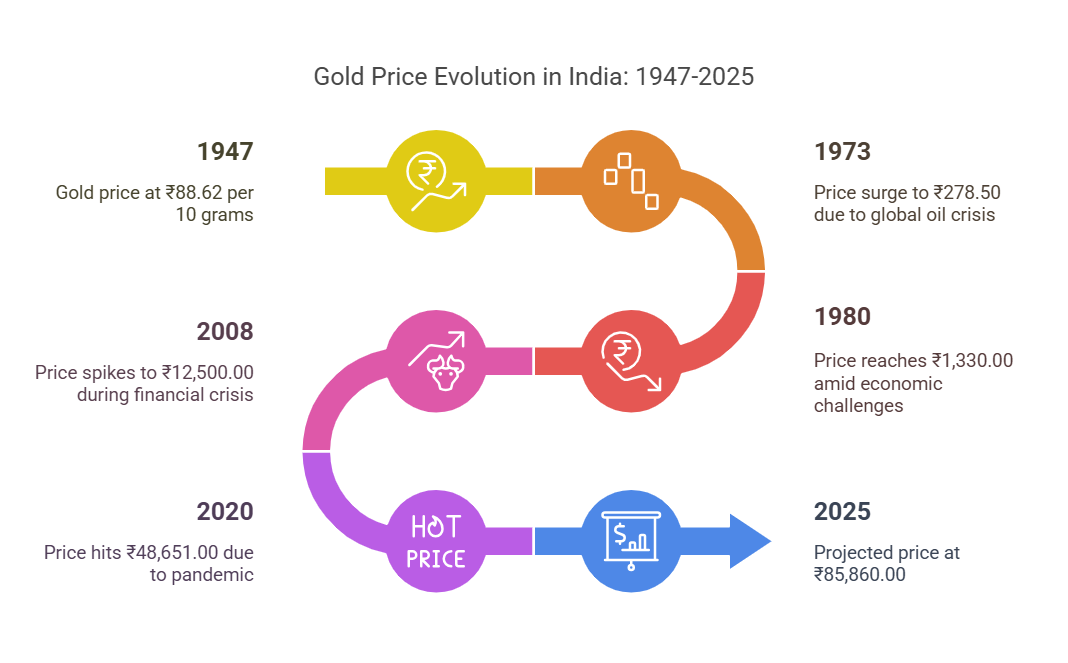
Gold prices in India have seen dramatic changes over the decades. Let’s take a trip down memory lane to understand how gold has performed over the years.
Pre-Independence Era – 1900s
Before India achieved independence, gold was essential as both a currency and a way to maintain wealth. Gold prices during this period stayed relatively stable, due to the established gold standard system. Since gold values were directly linked to the currency, variations were rare. The government-controlled gold imports, and the market wasn’t as open as it is today. During this period, gold was primarily seen as a cultural asset rather than an investment.
Post-Independence Period – 1947
Post-1947, India’s economic strategies started to change. The historical information on gold prices in this period shows a steady rise. The government enacted stringent rules on gold imports to control the economy, restricting the availability of the yellow metal and increasing its demand. Consequently, gold prices began to increase, reflecting India’s changing economic ambitions.
Liberalisation Phase – 1990s
In 1991, India’s gold market was transformed by economic liberalisation. By liberalizing the economy, the government permitted increased imports and implemented more adaptable pricing. Since the 1990s, there has been a significant increase in gold prices, influenced by evolving market conditions and heightened consumer demand.
A New Global Era – 2000s – Decade of Growth
The early 2000s significantly changed the global economy, influencing India’s gold prices. China’s rapid economic growth and the 2008 U.S. financial crisis triggered a worldwide surge in gold prices. In India, this period was marked by spikes in gold prices, reflecting international trends and the country’s economic development.
The 2000s were a golden era for gold prices. With increasing disposable incomes and a booming economy, Indians started investing heavily in gold. The global financial crisis of 2008 further boosted gold prices as investors sought safe-haven assets.
Volatility and Growth – 2010s
The 2010s were marked by both highs and lows. Gold prices hit an all-time high in 2011, only to fall sharply in the following years. However, by the end of the decade, prices had recovered and were on an upward trajectory.
Pandemic Era – 2020s
The COVID-19 pandemic brought unprecedented changes to the global economy, and gold prices were no exception. In 2020, gold prices in India crossed the ₹50,000 per 10-gram mark for the first time, driven by economic uncertainty and low interest rates.
Post-Pandemic Trend
With economies recovering and inflation stabilizing, gold prices have seen fluctuations. As of 2025, gold is trading between ₹115,000 and ₹120,000 per 10 grams, reflecting global market trends and economic policies.
Method of Checking Purity of Gold
What is Causing the Increase in Gold Prices?
Gold prices don’t move in a vacuum. Several factors influence the price of gold in India. Let’s break them down.
International Gold Rates
The fluctuation in global gold prices influences the gold rates in India. India’s economic connections with other nations significantly contribute to this aspect. Factors such as market sentiments, trade, and investment flows impact the Indian market.
Since India imports most of its gold, global prices play a significant role. Any change in international gold prices directly impacts domestic prices.
Dollar Exchange Rates
The value of the Indian rupee against the US dollar is another critical factor. A weaker rupee makes gold more expensive, while a stronger rupee can lower prices.
Demand and Supply
Festive seasons and weddings often drive up demand for gold in India, leading to higher prices. On the other hand, a surplus in supply can bring prices down.
Inflation and Interest Rates
Gold is often seen as a hedge against inflation. When inflation rises, so do gold prices. Conversely, higher interest rates can make gold less attractive compared to other investments.
Government Policies
The government develops various policies that impact the demand and supply of gold, consequently influencing its price. Import duties and taxes imposed by the government can significantly impact gold prices. For instance, an increase in import duty can lead to a spike in domestic gold prices.
Gold Investment Options in India
You can invest in gold online via several well-known platforms in India. These platforms are practical and accessible in various aspects. Explore some of the top gold investment opportunities listed below –
#1. Physical Gold – The Old but Gold Standard
Let’s face it, buying physical gold never really goes out of fashion in India. Whether it’s for weddings or as a rainy-day stash, it’s still the most emotionally satisfying way to invest.
Pros:
Cons:
-
Making charges (up to 25%)
-
Risk of theft and storage issues
-
Difficult to liquidate instantly at fair value
Still, if you’re emotionally attached to gold, physical assets like coins and biscuits are a better bet than heavy necklaces.
#2. Gold ETFs – Trade Your Way to Gold Gains
Gold Exchange-Traded Funds (ETFs) let you invest in gold without holding it physically. They’re listed on the stock exchange and reflect the real-time Gold Price in India.
How it works:
-
You buy units just like you’d buy stocks
-
Each unit represents approximately 1 gram of gold
-
Backed by physical gold held by the fund
Why it shines:
-
Safe and secure
-
Transparent pricing
-
Lower expense ratios
#3. Sovereign Gold Bonds (SGBs) – Earn Interest on Your Gold
SGBs are the most underrated gold investment option out there. Issued by the RBI, these bonds offer the benefits of gold plus a 2.5% annual interest!
Key Highlights:
-
Tenure: 8 years (with an exit option after 5)
-
Issued in grams (minimum 1 gram)
-
No capital gains tax if held till maturity
Why go for it?
Perfect for long-term investors who want to avoid the noise of daily Gold Price movements.
#4. Digital Gold – The 21st Century Piggy Bank
Gone are the days when gold investments meant standing in queues. Now, apps like Paytm, PhonePe, and Google Pay allow you to buy gold digitally, even for as little as ₹10.
What makes it click:
-
24K gold purity (usually)
-
Can convert to physical gold anytime
-
Real-time tracking of Gold Price
Heads-up: Storage is handled by the service provider, usually backed by secure vaults and audit trails.
However, unlike SGBs or ETFs, digital gold doesn’t have any regulatory backing—so tread with caution.
#5. Gold Mutual Funds – Your Portfolio’s Golden Armor
If you want gold exposure but don’t want to juggle between ETFs and stock market apps, gold mutual funds are your jam. These invest in Gold ETFs and are managed by professionals.
Advantages:
#6. Gold Savings Schemes – Traditional Meets Trendy
Jewelers like Tanishq, Kalyan, and Malabar offer monthly gold savings plans. You contribute monthly for, say, 11 months and get a bonus or discount in the 12th.
Should you invest?
-
Good for disciplined buyers
-
Fixed Gold Price not always guaranteed
-
Great for planning future jewelry purchases
Just remember—this isn’t an investment per se, but more of a pre-booking plan.
#7. E-Gold – NSE’s Hidden Gem
E-Gold, offered earlier by NSE’s NSEL platform, allowed investors to buy gold in dematerialized form. Though not currently active due to regulatory issues, similar platforms may arise in the future.
How it worked:
Watch this space—once rebooted, E-Gold could become a strong contender again.
#8. Gold Mining Stocks – Indirect, Yet Golden
Ever considered investing in companies that mine gold? While India has limited listed mining firms, global stocks via international mutual funds or ETFs can give you exposure.
Pros:
Cons:
#9. Gold Derivatives – Not for the Faint-Hearted
For experienced traders, derivatives allow speculation on future Gold Prices.
Benefits:
But beware—it’s not for beginners, and losses can be massive.
#10. Gold REITs – A New-Age Twist (Still Emerging)
Gold-focused Real Estate Investment Trusts (REITs) are a niche product abroad, but Indian markets may catch up. They typically invest in infrastructure for gold mining, logistics, or storage.
Watch this space—it might just become the next big thing.
#11. International Gold ETFs – Global Glint for Indian Investors
Indian investors can now invest in international gold ETFs through platforms like INDmoney or Kuvera.
What’s in it for you?
-
Exposure to global markets
-
Potential hedge against INR depreciation
-
Tracks global Gold Prices
Make sure to check for LRS rules (Liberalised Remittance Scheme) and other forex-related compliance norms.
Gold Price Prediction 2026-2030 and Beyond
According to a survey, gold prices in India could reach a value of $3000 by December 2027 because of changes in the US dollar. The following chart shows the projected gold rates for the coming decade –
| Year |
Expected Gold Price (24K/10gm) |
| 2026 |
₹ 155,000 |
| 2027 |
₹ 195,000 |
| 2028 |
₹ 2,20,000 |
| 2029 |
₹ 2,80,000 |
| 2030 |
₹ 3,00,000 |
| 2031 |
₹ 3,30,000 |
| 2032 |
₹ 3,75,000 |
| 2033 |
₹ 4,10,000 |
| 2034 |
₹ 5,00,000 |
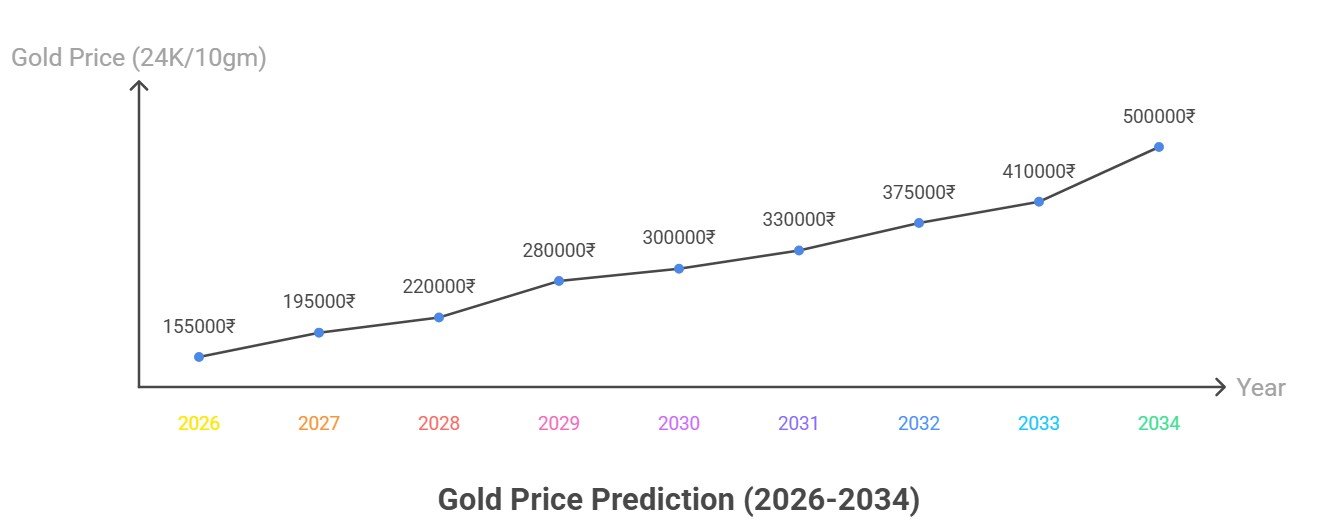
Gold Price Prediction 2026
Now, for the fun part: what do the pros say about gold price prediction 2026? Experts aren’t crystal ball gazers, but their forecasts, based on data and models, give us solid ground. UBS is optimistic, targeting $5,000 per ounce, driven by lower yields and economic woes. J.P. Morgan echoes that, eyeing $5,000 by Q4, with an average of $5,055, thanks to central bank buys and investor demand.
Goldman Sachs, tweaking their view, now sees $4,900 by year’s end, continuing the bull run. Over at the World Gold Council, they’re scenario-based: a mild slowdown could mean 5-15% gains, while a nasty recession might push 15-30% up from current levels. CoinCodex gets ambitious, predicting an average $5,540, ranging from $4,288 to $7,329.
Even Reddit folks are chiming in—some bet on $7,000+, citing ongoing dollar diversification and uncertainty. Trading Economics is more conservative, forecasting around $4,603 in 12 months. State Street sees $4,000-$4,500, but notes geopolitics could hit $5,000.
Synthesizing these, gold price prediction 2026 leans bullish, mostly in the $4,500-$5,500 range. But remember, experts can be wrong—markets have a mind of their own!
3 factors contributing to the rise in gold
- Concerns about a trade war have risen because of the US tariff strategy. This could hinder the pace of economic growth. Concerns about a worldwide recession have also risen. In this scenario, individuals are boosting their investment in gold. Gold is regarded as a secure investment in periods of economic downturn.
- The value of gold has risen because the rupee has depreciated against the dollar. The reason for this is that when the rupee declines, it becomes more expensive to import it. The rupee has lost roughly 4% of its value this year, creating upward pressure on gold prices.
- As the wedding season nears, the need for gold jewelry is rising. Jewelers in cities such as Mumbai, Delhi, and Chennai reported that although prices are elevated, sales remain strong since individuals view gold as a representation of investment and wealth.
This means gold is expected to cross a level of 1 Lakh or above in 2025 itself.
FAQs
1. Why do gold prices fluctuate so much?
Gold prices are affected by multiple factors, including inflation, interest rates, global economic conditions, and currency exchange rates.
2. Is gold a better investment than stocks?
It depends on your investment goals. Gold is a safer bet during economic downturns, while stocks generally offer better returns over the long run.
3. How does the Indian government influence gold prices?
The government affects gold prices through import duties, taxation, and regulations on gold purchases and trading.
4. Will gold prices continue to rise in the future?
Most experts predict a gradual increase in gold prices due to rising demand, inflation, and limited gold reserves.
5. What is the best way to buy gold in India?
The best way depends on your needs. If you want physical ownership, gold coins or bars are good. For investment, ETFs, digital gold, and sovereign gold bonds offer better returns with lower risks.
6. What is the best time to buy gold in India?
The best time to buy gold is usually during the off-season when demand is low, and prices are more stable.
Conclusion
Gold has consistently proven to be a dependable investment, and its past patterns indicate that it will remain a worthwhile asset going forward. Although temporary variations might take place, enduring expansion appears unavoidable. If you want to broaden your investment portfolio, gold is a reliable choice. Just be certain to keep informed about market trends and invest prudently!
Gold has stood the test of time as a valuable asset. Whether you’re looking to invest or simply admire its beauty, gold will always hold a special place in India. As we look to the future, gold prices are likely to remain strong, driven by cultural significance and economic factors.
Wrapping this up, gold price prediction 2026 paints a mostly rosy picture, with experts betting on climbs amid ongoing global jitters. From UBS’s $5,000 target to wilder $7,000 guesses, the consensus is upward, though not without bumps. We’ve covered the history, factors, scenarios, and strategies—hopefully, it’s given you food for thought.
Remember, investing’s personal; do your homework, maybe chat with an advisor. Gold’s endured through ages, and in 2026, it might just keep glittering. Excited? You should be— the future’s golden! Stay tuned to markets, and who knows, your predictions might outshine the pros.