
Blog Page 358

10 Options for LIC Premium Payment

Gone are the days when you need to stand in long queues to make LIC premium payments. LIC now offers 10 different options to make premium payments.

Life Insurance Corporation of India (LIC) is undoubtedly one of the most trusted names when it comes to insurance in India. Millions of policyholders rely on LIC for their long-term financial security and peace of mind. However, once you have a policy, keeping the premiums paid on time is crucial to keep the benefits active. Thankfully, LIC has evolved with the times, offering numerous payment options to suit everyone’s convenience.

So, what are the top 10 ways you can pay your LIC premium? Whether you’re tech-savvy or prefer traditional methods, we’ve got you covered. Let’s explore!

LIC premium payment

10 Options for LIC Premium Payment

1. LIC Online Payment Portal

Gone are the days of waiting in long queues! LIC’s official website provides a simple and seamless platform to pay premiums online.

Here’s how it works:

  • Visit the LIC official portal (licindia.in).
  • Go to the “Pay Premium Online” section.
  • Enter your policy details and proceed to pay via Net Banking, Credit Card, Debit Card, or UPI.

The portal is user-friendly, and payments are processed instantly. You’ll also receive an acknowledgment immediately via email or SMS for your records.

2. LIC Mobile App (LIC Pay Direct)

Prefer managing your insurance on your smartphone? LIC’s official mobile app, “LIC Pay Direct,” is a game-changer.

  • Download the app from Google Play Store or Apple App Store.
  • Log in with your credentials.
  • Go to the premium payment section, enter the policy details, and pay securely.

The app also allows you to check your policy status, due dates, and premium receipts on the go. Talk about convenience at your fingertips!

3. Electronic Clearing Service (ECS)

Hate the hassle of manual payments every month? Set up an ECS mandate, and LIC will automatically deduct the premium from your bank account on the due date.

Benefits of ECS include:

  • No late fees or missed payments.
  • Completely automated and stress-free.

To set it up, you need to submit an ECS form along with a canceled cheque to your LIC branch. It’s a one-time effort for years of peace.

4. LIC Premium Payment via Banks

Several nationalized and private banks are authorized to collect LIC premium payments. If you prefer banking channels, this method is perfect.

Here’s what you need to do:

  • Visit your bank’s branch or online portal.
  • Use the LIC policy number and other details to pay the premium.
  • Most banks offer both online and offline options for LIC payments.

ICICI Bank, HDFC Bank, and Axis Bank are a few popular choices. Payments are secure, and you get instant confirmation.

5. Payment Through Credit and Debit Cards

If you enjoy the rewards and cashback that come with using credit cards, this method might be for you. LIC accepts payments through most major credit and debit cards.

How to pay:

  • Visit the LIC website or mobile app.
  • Choose the “Credit/Debit Card” option during checkout.
  • Enter the necessary card details and proceed with the payment.

This method is quick, secure, and often comes with perks like reward points or cashback depending on your bank.

6. UPI Payment

UPI (Unified Payments Interface) has revolutionized digital transactions in India. Paying your LIC premium via UPI is fast, hassle-free, and requires no complex banking information.

Steps:

  • Go to the LIC portal or app.
  • Select the UPI option during premium payment.
  • Enter your UPI ID and approve the payment request on your UPI app.

Apps like Google Pay, PhonePe, and Paytm make UPI payments a breeze, and you get instant confirmation.

7. LIC Premium Payment via Wallets (Paytm, PhonePe, etc.)

Digital wallets have become a popular way to handle transactions, including LIC premium payments.

Here’s how:

  • Open your wallet app (like Paytm, PhonePe, or Amazon Pay).
  • Go to the “LIC Premium Payment” option.
  • Enter your policy details and proceed to pay.

These apps often provide cashback offers or discounts on bill payments, giving you added value.

8. LIC Branch Offices

If you’re someone who prefers traditional methods, paying your premium at a LIC branch office is still an option.

Simply visit your nearest LIC branch with your policy number and premium amount. You can pay in cash, cheque, or demand draft (DD).

Pros:

  • Personalized service.
  • Instant receipts and confirmation.

However, keep in mind that branch visits can involve waiting in queues, especially around premium due dates.

9. Authorized Franchisees and Agents

LIC has partnered with authorized agents and franchisees like AP Online, MP Online, and Suvidha Centres to collect premium payments. You can visit these centers and pay your premium with ease.

What to expect:

  • Provide your policy details and payment amount.
  • Receive a printed receipt as proof of payment.
  • These centers are widely available in urban and rural areas alike.

This method is especially useful if you don’t have easy access to a branch office or the internet.

10. ATM Payments

Yes, you read that right! Some banks allow LIC premium payments through their ATMs.

How does it work?

  • Visit your bank’s ATM.
  • Insert your debit card and choose the “Bill Payment” option.
  • Select LIC as the biller, enter your policy number, and confirm the payment.

Banks like Axis Bank and Corporation Bank offer this service. It’s a great offline option for those who may not use the internet much.

Paying your LIC premium has never been easier with so many options at your disposal. Whether you’re tech-savvy or prefer a more traditional approach, there’s a method tailored just for you. From online portals and mobile apps to bank channels and offline payments, LIC ensures every policyholder can pay their premiums without a hitch.

The key is to choose a method that suits your lifestyle. Want a hassle-free experience? Go digital with the LIC app, UPI, or wallets. Prefer face-to-face transactions? LIC branch offices and agents have got you covered. Just don’t miss your premium due date to keep your policy benefits active!
10 Best Real Estate Apps on android smart phone

0

Today everything is mobile including real estate. Yes now you can find property on the go by using real estate app on smart phone. If you are hunting for good property within your budget these real estate app will surely help you to narrow down your search. These real estate apps will also help you to know prevailing property rates at nearby locations.

Here are 10 Best real estate app for your android smart phone. You can download these apps from google play store.

Best Real Estate App for India

Common Floor

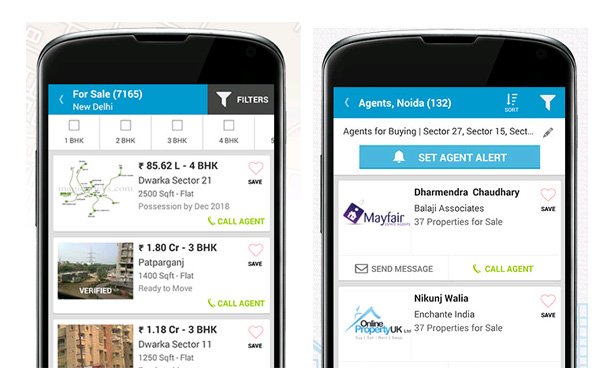
Common Floor is top real estate website of India. The real estate app “Common Floor Property search” by commonfloor brings best real estate deals on mobile. This real estate app gives freedom to find property for buy, sell and rent on the move. This app also includes map search facility. You can filter property by defining size, amenities, bank approvals, rates, nearby facilities etc. You can share property details with friends, relatives. It also allows you to post your requirement related to real estate.

99acres

“99acres real estate and property” is free app for searching property across India. This app offers rich photos, attractive videos and interactive maps for all kind of properties.  This real estate app offers map view along with nearby amenities such as market, ATM, garden, airport, school, restaurant, shopping mall, railway station etc. This app allows you to send SMS/E-mail to property advertiser for free.

MagicBricks

MagicBricks leading real estate portal of India offers property search on the move with mobile app called as “MagicBricks Property Search”. Apart from refining search this app also offers facility to create email alerts to get matching properties automatically. You can save and access properties and projects for future reference.  This real estate app also offers facility to read latest news pertaining to real estate domain.

magic brick real estate

Sulekha

Sulekha is multipurpose app which will not only help you to find property it will also help you to find local services including business, education and job listing. This app provides very good set of filter when it comes to your real estate requirements. It contains integrated option to contact advertiser.

India Property

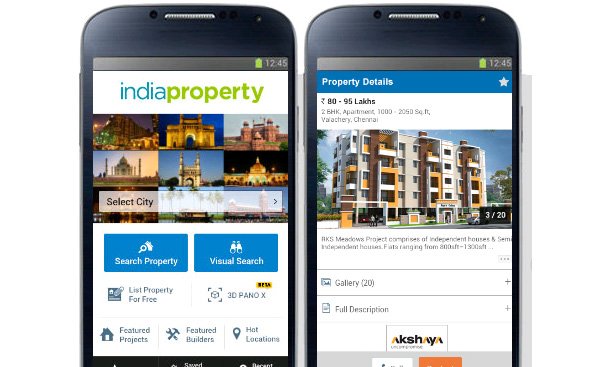
India Property app allows you to search over millions of property listing for sale or rent across the India. This app contains unique feature called as “Property Lens”. This feature helps end-user to view map view and list view of property. You can find distance between various properties. It will also help you to get other information about properties.

India Property Real estate

Best Real Estate App for USA

Zillow

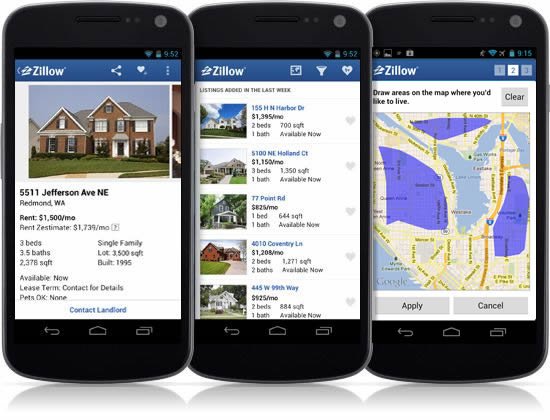
Zillow is leading property portal for US. Zillow real estate app provides facility to search family homes, apartments, condos, town homes from millions of listing. This app can also help you to get pre-approved loan & mortgage rates from trusted lenders. You can get personalize loan quotes from this app. This app offers voice search and map search facility.  Zillow helps you to save your search result. This real estate also offers facility to receive notification about publishing of new listing, drop in price etc.

Zillow

Trulia

Real estate search and discovery is very easy by Trulia real estate app. This app brings built-in GPS facility to search nearby properties.  This app provides photo slide show facility. Unique feature about this app is it comes with crime map and cross device access facility.

Relator

Relator is largest property portal which provides property search facility across 33 countries & 11 languages. Relator offers multiple real estate apps for sale, rental and mortgage calculations. Relator real estate app is unique where 90% of listings is getting updated every 15 minutes and rest are getting updated at least once a day. This app keeps you updated with true status of real estate and apartment listings including offer price.

Century 21

Century 21 real estate mobile app allows you to search listing across US. Century 21 brings details information about property including price, size in square foot, estimated mortgage, taxes applicable, property features, pictures, directions etc.

Home Snap

Home Snap is unique real estate app. Just take snaps of property and upload it for buyers on the move. Very user-friendly app. Recommended app for all buyer and sellers.

So, what are you waiting for install these apps on your mobile and explore the world of real estate. If we have missed any app here you are requested to contact us and we make sure it will be listed.

If you have already explored this apps do share your experience with us.

21 Online Business Ideas with low investment

Ever dreamed of ditching the 9-to-5 grind and becoming your own boss? Well, you’re in luck! In today’s digital world, starting an online business doesn’t have to cost an arm and a leg. With just a laptop, a sprinkle of creativity, and some elbow grease, you can launch a venture that fits your lifestyle. This article dives into 21 online business ideas with low investment—ideas that won’t leave your wallet crying for mercy. Plus, we’ll sprinkle in a dash of workflow automation to make your life easier. From blogging to dropshipping, these opportunities are perfect for anyone looking to dip their toes into entrepreneurship without breaking the bank. So, grab a coffee, and let’s get rolling—your future empire awaits!

online business ideas

21 Online Business Ideas

Content Creation

Content’s where it’s at these days, and you don’t need a big budget to shine. With a bit of know-how and some automation tools, you can turn your passion into profit.

1. Blogging

Blogging’s a classic for a reason! Pick a niche you love—say, travel or tech—grab a cheap domain and hosting (think $50 a year), and start writing. Use tools like Buffer to automate social media posts and watch your audience grow. Monetize with ads, affiliate links, or your own products. It’s slow going at first, but stick with it—pretty soon, you’ll be raking in cash while sipping coffee in your pajamas!

2. Affiliate Marketing

Wanna earn commissions without creating your own stuff? Affiliate marketing’s your gig. Promote products on a blog or social media, and cash in when folks buy through your links. Automate email campaigns with Mailchimp to keep your audience engaged. Choose products you’d actually use—trust me, your readers can smell a fake pitch a mile away!

3. Podcasting

Podcasting’s booming, and you don’t need much to join the party—just a decent mic (under $100) and a hosting platform like Buzzsprout. Record episodes on topics you’re jazzed about, and automate uploads with scheduling tools. Sponsorships, donations, or your own merch can line your pockets. Who’d have thought talking could pay so well?

4. YouTube Channel

Lights, camera, action! Starting a YouTube channel’s a blast and super cheap—your smartphone’s camera is plenty to start. Create videos on whatever tickles your fancy, from DIY hacks to gaming. Automate uploads with YouTube’s scheduler and earn through ads or sponsorships. Keep pumping out quality content, and you’ll be a star in no time!

20 Business Ideas with No Startup Cost

Services

Got skills? Offering services online is a fast track to cash, and you can automate the boring bits to focus on what you love.

5. Freelance Writing

If words are your thing, freelance writing’s a no-brainer. Write blog posts, ads, or even books for clients on platforms like Upwork. Use tools like Grammarly to polish your work and Zapier to automate client follow-ups. Before you know it, you’ll have a steady stream of gigs—and all you needed was your trusty laptop!

6. Virtual Assistance

Busy folks need help, and virtual assistants save the day! Handle emails, schedules, or data entry from home. Automate repetitive tasks with Trello or Asana to stay on top of things. Network or sign up with sites like Belay to snag clients. Organized and ready to roll? This one’s for you!

7. Social Media Management

Social media’s a jungle, and businesses need guides. As a manager, you’ll whip up posts, engage followers, and track stats. Tools like Hootsuite automate scheduling, leaving you free to brainstorm killer content. If you’re glued to Instagram anyway, why not get paid for it?

8. Online Tutoring

Know your stuff in math, languages, or history? Online tutoring’s a goldmine. Teach via Zoom or platforms like Chegg, setting your own hours. Automate bookings with Calendly—less hassle, more teaching! It’s rewarding, flexible, and doesn’t need much to start.

9. Web Design

Building websites is hot, and you don’t need a fat wallet to begin. Use Wix or WordPress to craft stunning sites for clients. Automate client updates with email tools like ActiveCampaign. Got design chops? A portfolio’s all you need to land your first gig!

10. Graphic Design

Logos, posters, social graphics—graphic design’s a creative cash cow. Start with Canva or Adobe Spark (cheap or free options) and automate client proofs with Google Drive. Pitch on 99designs or social media. Eye-catching work dangling in front of clients? They’ll be hooked!

11. SEO Consulting

SEO’s the secret sauce for online visibility, and businesses crave it. Help them rank higher with keyword tricks and analytics know-how. Automate reports with SEMrush or Google Data Studio. It’s a skill worth learning—clients will pay big to be found!

12. Online Coaching

Life, fitness, or career coaching—whatever your expertise, people need guidance. Host sessions via Zoom and automate scheduling with Acuity. Certification’s a bonus, but passion sells too. Build a site, share your story, and watch clients flock to you!

13. Translation Services

Fluent in more than one language? Translation’s a sweet deal. Tackle docs or websites for clients on Gengo or Fiverr. Automate invoicing with Wave to keep cash flowing. Quick and accurate, you’ll be bridging language gaps in no time!

14. Transcription Services

Turn audio into text with transcription—perfect if you type fast! Start on Rev or TranscribeMe, automating file delivery with Dropbox. Specialize in legal or medical for higher rates. Ear on, fingers flying—you’re set!

15. Online Bookkeeping

Numbers your jam? Online bookkeeping keeps businesses’ finances in check. Use QuickBooks or Xero, automating reports for clients. Certification helps, but experience counts too. With more companies going remote, this one’s a steady earner!

E-commerce

Selling stuff online doesn’t mean stocking a warehouse. These e-commerce ideas keep costs low and profits high.

16. Dropshipping

Dropshipping’s the ultimate hands-off hustle. Set up a Shopify store, pick trending products, and let suppliers ship ‘em. Automate orders with Oberlo—zero inventory stress! Research what’s hot, and you’ll be selling like crazy without breaking a sweat.

17. Print-on-Demand

Design tees, mugs, or totes without touching a printer—print-on-demand’s genius! Platforms like Printful handle production while you focus on cool designs. Automate marketing with social ads. Creative and low-risk, it’s a win-win!

18. Selling Digital Products

E-books, templates, or apps—digital products are pure gold. Create once, sell forever on Gumroad or your site. Automate delivery with email tools like ConvertKit. Got a niche idea? Turn it into profit with minimal fuss!

19. Selling Handmade Crafts Online

Crafty hands, listen up! Sell your creations—jewelry, decor, whatever—on Etsy. Automate listings with Etsy’s tools and snap great pics. Small batches, big heart—buyers love that personal touch!

20. Creating and Selling Online Courses

Teach what you know with online courses—huge demand, tiny startup cost! Use Teachable to host, automating enrollment and updates. From coding to yoga, there’s an audience waiting. Plan it out, and you’ve got passive income on lock!

Other

These wild cards don’t fit the mold but still pack a punch for low-investment wins.

21. Stock Photography

Love snapping pics? Sell stock photos on Shutterstock or Adobe Stock for royalties. Automate uploads with batch tools—set it and forget it! High-quality shots dangling out there? Cash keeps trickling in!

FAQs

Got questions? We’ve got answers! Here’s the lowdown on starting your online business.

1. How much cash do I need to kick things off?
Not much! Most of these online business ideas need less than $100—think domains, hosting, or a basic tool subscription. Some, like freelancing, just need your skills and a Wi-Fi signal!

2. Do I need to be a tech wizard?
Nope! Sure, web design or SEO takes some know-how, but blogging or tutoring? You can learn as you go. Free tutorials are everywhere—YouTube’s your new best friend!

3. How soon can I see some profit?
Depends on the gig. Selling digital products might pay off fast, while blogging takes months to build. Keep at it—good things come to those who hustle!

4. Can I do this part-time?
You bet! Start small—nights or weekends—and grow as you go. It’s perfect for testing the waters without diving in headfirst.

5. What’s the catch with these low-cost ideas?
No huge catch, but risks like competition or slow starts exist. Workflow automation helps—streamline tasks and stay ahead. Plan smart, and you’ll dodge most headaches!

Conclusion

There you have it—21 online business ideas with low investment to kickstart your entrepreneurial dreams! Whether you’re spinning content, offering services, or selling goodies, these opportunities prove you don’t need deep pockets to succeed. Toss in some workflow automation to keep things humming, and you’re golden. Success won’t land in your lap overnight, but with grit and a solid plan, you’ll get there. So, what’s stopping you? Pick an idea, dive in, and build something amazing—your future self will thank you!