

Blog Page 350

Electronic Verification Code (EVC) for Income Tax Return

Electronic Verification Code

Electronic Verification Code for Income Tax Return – Now one can e-verify income tax return using electronic verification code (EVC). Central Board of Direct Taxes has issued notification on 13th July, 2015 for using Electronic Verification Code for e-filing income tax return. If you verify income tax return using EVC, you need not to send paper acknowledgement by post to CPC Bangalore.

What is Electronic Verification Code?

  • Electronic Verification Code (EVC) is Code or PIN number used to verify the identity of the person furnishing income tax return.
  • The EVC will be 10 digit alpha numeric number/code.
  • The EVC can be generated on E-filing website (http://incometaxindiaefiling.gov.in) of Income Tax department.
  • Individual filing income tax return ITR1, ITR2, ITR2A, ITR4, ITR4S can use this EVC. Karta of HUF can also use EVC for verification of Income Tax Return.
  • EVC generation process varies based on risk-category of the Assessee.
  • The Eve would be unique for an Assessee PAN and Will not valid for any other PAN at the time of filing of the Income Tax Return.
  • One EVC can be used to validate only one return of the Assessee irrespective of the Assessment Year or return filing type (original or revise) .
  • The EVC will be valid for 72 hours.
  • The verifier can use multiple mode to generate EVC and can generate EVC multiple times.

How to Generate Electronic Verification Code?

Electronic Verification Code Generation through Net Banking  

  • Some specified banks authorized with Income Tax Department for generation of EVC may provide direct access to e-filing website. The link will be provided by bank only in the case of verifier PAN card is validated by bank during process of KYC.
  • One can use Internet banking user id and password to login to Net banking site. Once user see this link and click on that he/she will be redirected to Income Tax site for the generation of EVC. EVC generated using this process will be send to register mobile number of verifier.

Electronic Verification Code Generation through Aadhar Card

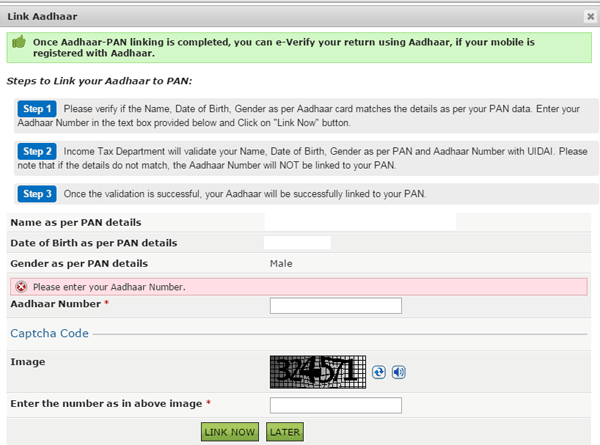
  • You can link your Aadhar Card with PAN number on e-filing website. Once Aadhar-PAN linking is complete, you can e-verify your return using Aadhar.
  • If your mobile is registered with Aadhar one OTP will be generated by UIDAI and sent to your mobile number. This Aadhaar OTP will be the EVC and can be used to verify your Income Tax return. The Aadhaar OTP as EVC will be valid for 10 minutes (or as specified by UIDAI).
  • In order to link your Aadhar card with PAN you need to login to e-filing website. On logging to this site you will see pop up display message for Aadhar-PAN linking.
Link Aadhar EVC

Electronic Verification Code Generation through ATM

  • If your ATM card is linked to PAN card validated bank account and bank is registered with Income Tax department for providing this services can generate EVC using this method.
  • Under this method you need to access the ATM of the Bank using ATM PIN at ATM Kiosk. On ATM screen you will find option to generate EVC for Income Tax return filing.
  • On clicking this you will get EVC on your register mobile number. 

Electronic Verification Code Generation through E-filing website

  • If your total income as per the Income Tax Return is Rs. 5 Lakh or below and there is no refund claim you can generate EVC on E-filing website.
  • EVC generated using this method will be send to you on register e-mail id and mobile number.
  • You can use this EVC to verify your income tax return.

Generate EVC

How to e-verify your Income Tax return using EVC?

  • Login to e-filing website using your credential.
  • Click on Upload Return and submit your Return
  • You will see message Return is uploaded (Pending for e-verification)
  • Click on e-Verify Return under tab e-file.

e-verify return

  • Uploaded returns of last 120 days pending for e-verification will be displayed.
  • Click on e-verify.
  • You will be prompted for four different option to e-verify return.

Option -1 “I already have an EVC and I would like to Submit EVC”

Step -1 Provide EVC in text box and press submit

Step -2 Download the Acknowledgement (No action is required)

Option-2 “I do not have an EVC and I would like to generate an EVC”

Two options are provided –

Generate EVC using Net Banking

Step -1 Login to your Net Banking account.

Step -2 Click on e-verify Return

Following banks provide facility of filing return using Net Banking.

Allahabad Bank
Andhra Bank
Axis Bank Ltd
Bank of Baroda
Bank of India
Bank of Maharashtra
Canara Bank
Central Bank of India
City Union Bank Ltd
Corporation Bank-Coroorate Banking
Corporation Bank-Retail Banking
DENA BANK
HDFC Bank
ICICI Bank
IDBl Bank
Indian Bank
Indian Overseas Bank
Kotak Mahindra Bank
Oriental Bank of Commerce
Punjab National Bank
State Bank of India
syndicate Bank
UCO Bank
Union Bank of India
United Bank of India
Vijaya Bank

Generate EVC to register e-mail id and Mobile Number.

Step -1 Enter EVC sent to you in your E-mail id and Mobile number and click on submit.

Step -2 Download the Acknowledgement (No action is required)

Option-3 “I would like to generate Aadhaar OTP to e-Verify my return”

Step -1 Enter Aadhar OTP sent to you on your register Mobile number and click on submit.

Step -2 Download the Acknowledgement (No action is required)

Option-4 “I would like to e-Verify later/ I would like to send ITR-V”

Step -1 Download the Acknowledgement ITR- V

Step-2 Send ITR-V to CPC Banglore by Post.

I hope you find detail given in this article useful. If you have any query related to filling of income tax and e-verification using EVC, do post in comment section given below. I will surely answer them.


15 Tools & Apps for a Startup Company

You might have selected good business ideas for your upcoming startup company. You might be ready with the resources and money required to make this startup company successful. However, executing those ideas in a correct manner is a difficult task. In order to help you in fulfilling your business dream here are 15 Tools & Apps for your startup company.

15 Tools Application for Startup Company

15 Tools & Apps for a Startup Company

 1 Trello

Trello is a very useful task manager for your startup company. This free tool offers the facility to manage tasks in an organized manner. You need not maintain lengthy email, spreadsheets, and sticky notes for your project you can use Trello which provide a flexible and visual way to organize everything. A business version of this tool gives additional administrative controls and security.

2 OneNote

OneNote is a popular tool from Microsoft. OneNote can give multiple benefits to your startup. You can work in an organized manner using OneNote. It allows you to take notes on the fly. You can record minutes of meetings using OneNote. You can add any file, email, and tag information to this tool. I highly recommend the usage of this tool for a startup company.

3 Bidsketch

Bidsketch is proposal software that allows you to create professional client proposals in minutes. You can customize these proposals as per your requirement. You can even electronically sign these proposals. It is a paid product but if your startup company is involved in writing a lot of proposals to clients I recommend having a look at Bidsketch.

4 Recuruiterbox

It is obvious that you require good manpower to run your startup company. Recuruiterbox is a software that helps you to carry out the recruitment process easily. You can track and manage job applications. You can customize your recruitment process with this tool. You can even organize and share a review about candidates using this tool. It will also help you to do resume management.

5 Zoho Invoice Generator

Zoho Invoice generator is a free online tool that will help you to generate your invoice quickly. This tool gives various editable fields. You just need to input data and your Invoice is ready. You can print the invoice or save it for reference. It is the fastest and easiest method to generate an invoice.

6. Vyapar Invoicing software

Vyapar is GST Billing Software in India for small businesses. You can manage your business professionally with Vyapar. Vyapar is the software for billing, inventory, and accounting needs. It is a desktop-based application that allows you to create GST Bills for customers. You can share them online. You can manage bills and send payment reminders to recover dues. It also helps in managing inventory. Overall it is very good software for small and medium-size business owners.

7 DropBox

During the startup process of your business, you may need to store and keep a lot of documents. If you want to exchange information with other you can use DropBox. DropBox gives you a free facility to store your data.

8 Slack

Slack is a free communication tool for effective collaboration. This is a similar tool to MS Teams it allows you to do group conversations, file sharing, and content search. Slack is free to use for as long as you want and with an unlimited number of people. The paid version of Slack includes guest access, a searchable archive, etc.

9 Flyp

Flyp app allows you assign six phone numbers on your smartphone. This number remains simultaneously live on your smartphone. You can have a dedicated number for every activity. Each number has own SMS, voicemail, and profile facility.

10 Basecamp

Basecamp is online project management and collaboration tool. This tool gives essential workspace to a team for day to day operations. Basecamp is cloud base platform which gives task list, discussion platform, documents and calendar for project management. One can integrate basecamp with other desktop and web-based applications.

11 Wrike

Wrike is an online Project management tool for your startup company. Wrike combines project management with a real-time workspace for collaboration, discussion, and document sharing. You can set a goal, define priority, and track projects using this tool. This tool helps you to improve your planning and accountability.

12 Invision

Invision is a design, prototyping, collaboration, and workflow tool. You can transform static designs into a clickable prototypes using this tool. You can present and share designs using this tool. You can even gather feedback on the design. It is the best project management tool for web designers.

13 Product Hunt

Product Hunt is a tool to share and discover new products for your startup company. You can find detail about competitor products on this site. You can also share your product on this website and increase your revenue. Product Hunt is a free tool.

14 Quickbooks

Quickbooks help your startup company to organize your finances at one place. You can do invoicing, bookkeeping, billing, expense tracking, and sales using this tool. This tool works across all devices. (iPad, iPhone, Android). It helps business owners to make an informed decisions. You can avail of 30 days free trial of this tool before purchasing.

15 intercom.io

Intercom is a customer communication platform. Intercom helps you to have a live conversation with the customer. You can send targeted messages to website visitors and users of your app. Intercom gives you a free trial pack for 14 days. The observation package of this tool is free forever. You must try this tool for your business.

Hope you find the above tools useful and interesting. Please help us in growing this list by adding tools that you use for your startup company.

Do share your experience of using various tools & apps.

How to know your Gratuity Benefits – Calculator Download

Gratuity Calculator

Gratuity is a monetary reward paid by an employer at the end of employment. This benefit is applicable if you stay in employment for 5 years or more. It is a mandatory benefit as per the Payment Gratuity Act India 1972. This act applies to all establishments, where 10 or more employees are working in the preceding 12 months. If you are changing your job and want to calculate gratuity benefits here is a simple gratuity calculator, eligibility, and tax benefits.

Eligibility

  • An individual is eligible for gratuity benefits if he/she has completed 5 years of continuous service in the organization.
  • This benefit is not applicable if employment is terminated due to disability or due to death. In case of death, this benefit is payable to the nominee or legal heir.
  • The maximum amount payable shall not exceed 10 Lakh.
  • The time limit is 30 days of gratuity becoming payable.

Employer needs to pay gratuity amount –

  • On Resignation
  • On Retirement, Voluntary retirement, Superannuation
  • On Termination or Layoff
  • On Death
  • On Disablement

The application can be made by –

  • An individual eligible employee
  • Nominee of the employee (In case of death)
  • Legal Heir of the employee (If nomination is not made)

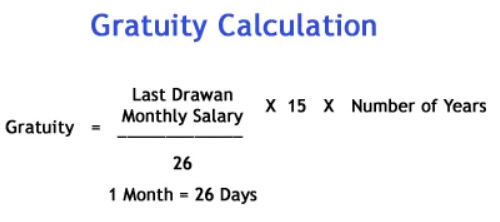
Gratuity Calculation –

The gratuity calculation of employees working with a company covered by the gratuity act is given below.

G = Y x S x 15/26

S = Last Drawn Monthly Salary (Basic + DA)

Y = Number of Years Completed in Service

15 = 15 days salary

26 = Number of working days in the month

Let’s say your last drawn monthly salary is 30,000 Rs and you have worked for the organization for 10 years. The amount payable would be

Gratuity Amount = 30,000 x 15 x 10 / 26 = 1.73 Lac

Download Gratuity Calculator

Gratuity Calculate

Note – The number of Years would be rounded off to the nearest year. The last 6 months or less are to be ignored, however, if it is more than 6 months it is to be counted as a full year.

You can download this Calculator from the following link.

Gratuity Calculation

Taxation 

The gratuity amount is taxable if received when you change your job (on resignation) or on termination. This amount falls under the head of “salaries”.

If this amount is paid at retirement, death, or superannuation it is tax exempted.

Conclusion –

The gratuity calculator given above will help you in calculating the right gratuity amount. If you are planning to change your job just before 5 years, do consider your decision after calculating gratuity amount. You may lose this excellent benefit you are entitled to after completion of 5 years.

How to become a Successful Entrepreneur?

successful

Becoming entrepreneur means building a business that is completely yours. The dream of becoming a successful entrepreneur is seen by 10 out of 9 people, but very few get succeeded in fulfilling this dream. If you are far away from success and planning to quit entrepreneurship hold on don’t take any irrational decisions until you finish reading this post. What you learn here may change your life and make you successful as an entrepreneur.

How to become a successful entrepreneur?

1 Stay energetic and zealous

To be a successful entrepreneur you need to be energetic. The new business demands more time and dedication. You have to stay excited about your product and energy. You energy will translate to everyone you meet and speak about your business and this will lead to business growth.

2 Build a Team of skilled and successful people

Another important thing is to build a team of skilled and successful people. You cannot do every function of your business on your own (finance, sales, marketing etc.). Another important thing is you need to learn how to get work done from others.

3 Create something that is unique

You need to be innovative in order to get succeeded as an entrepreneur. Bring out innovation (Out of box thinking) make unique product or service ideas. By this way, you are reducing a chance of competition and increasing the chance of being successful as an entrepreneur.

4 Love what you do

To be successful, the first thing you need to do is to fall in love with your work. Love for your work will act as driving force. You have to be passionate and positive about your business and it will surely increase your chance of becoming successful.

5 Learn from your mistakes and Failures

Any mistake leaves wonderful learning lessons. Mistakes are inevitable provided you learn from your mistake. Success comes when you are able to digest and learn from your failure. Your action after your failure plays an important role in shaping your success.

6 Never stay comfortable

You should never stay comfortable in the business. Always protect your business you never know your business may be under threat. You should be ready with water or fire extinguisher before fire rather than finding it then.

7 Take a Risk

To become a successful entrepreneur, you should know where to take a risk and where to play safe. Remember most successful entrepreneurs like Ambani or Tata didn’t get to where they are playing it safe. Calculated risk always helps you take your business at next level.

8 You have to take stair to success, there is no elevator

No one ever gets succeeded by taking one giant leap. You have to use staircase for becoming successful. Take small and meaningful steps towards your goal.  Keep moving slowly remember “Slow and Steady will win the race”.

There is no elevator for success. Remember “Bigger dreams can be accomplished by setting smaller objectives and working on them on a daily basis.”

9 Stay connected with successful people

Your success depends upon the type of people you live with. Stay connected with successful people. You can learn from these people what it takes to be successful.

entrepreneur

At the end, I would like to say “Winner Never Quits, Quitters Never Wins.” Follow tips given above and I am sure you will become a successful entrepreneur.

Successful Entrepreneur