Blog Page 336

NPS Mobile App for National Pension System Subscribers

NPS mobile app

New NPS Mobile App is released recently by NPS for the NPS subscribers. This mobile app is available on ‘Google Play Store’ as ‘NPS by NSDL e-Gov’ for installation and use. A launch of NPS Mobile App is a very good step taken by PFRDA to make NPS scheme user-friendly. This app allows you to get your account information on the move. In addition to this, it also gives you multiple other features.

NPS Mobile App Features

View current Holdings

This mobile app allows NPS subscriber to view his/her NPS account details including scheme wise unit holding along with latest NAV and portfolio value.

Request for Transaction Statement for the year on your email ID.

NPS subscriber can request for transaction statement using this application. This statement will be received on register email ID of the subscriber.

Also Read – How to open NPS account online?

Change contact details like Telephone, Mobile no. and email ID & password.

NPS subscriber can change contact details like telephone number, mobile number and email id using this app. Even this NPS Mobile app allows a subscriber to change the password, secrete question and regeneration of password.

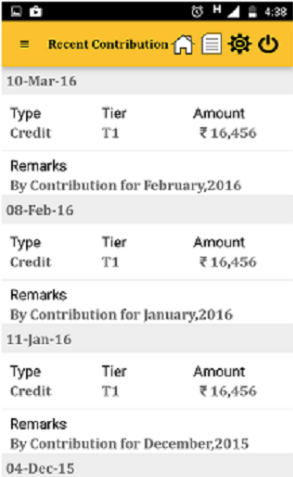
View Last 5 contribution transactions carried out

You can get information about last 5 contributions made in your account. This will help you track a balance in your NPS account.

Get notifications related to NPS.

You can also get notification related to NPS on your mobile. It is like subscribing for important information about NPS account related news.

How to use NPS Mobile App?

First, visit Google play and install NPS by NSDL e-Gov app in your mobile.

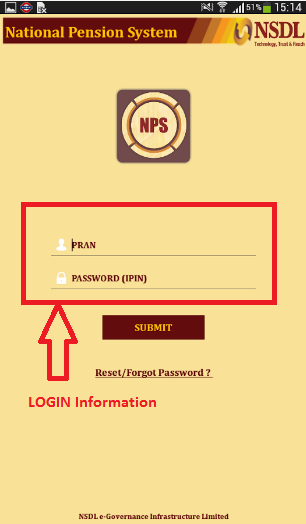
Once this app is installed on your mobile you will be asked to login using your PRAN number and Password (IPIN). IPIN is internet password sent by CRA to your register address.

NPS Mobile App Login

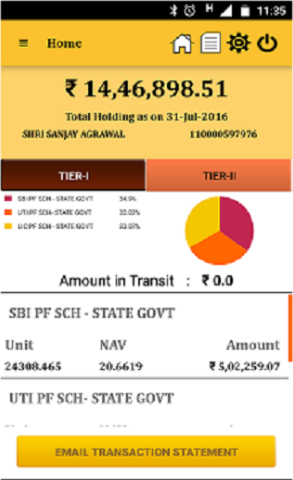
Once you login to app you can view your current holdings. It will give you information like current holdings, type of account, number of unit held and NAV. If you want transaction statement on your email you need to click on “Email Transaction Statement” button.

NPS mobile app balance

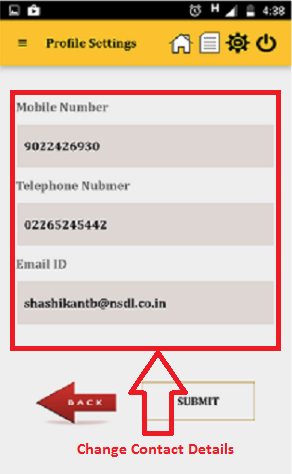
Next, you can visit profile section and change details like Mobile number, telephone number, and email id.It will also allow you to change your password for login from profile setting tab.

NPS Mobile App contact details

NPS subscriber can get last 5 recent contribution details by visiting recent contribution tab.

NPS mobile app contribution

NPS Mobile App is very good initiative and it will defiantly help NPS Subscribers.

How to take PPF Loan against account balance?

PPF Loan

Public provident fund (PPF) is one of the best tax saving investment option. If you have PPF account you are entitled to take PPF Loan against your account balance. PPF Loan is available at low interest for the shorter duration.

Imagine a situation where you need a cash urgently. What do you do? Generally, you approach a bank and take a personal loan. A personal loan is the fastest way to get money from a bank. However, please note that taking a personal loan is a costlier affair. The interest rate charged on the personal loan is very high 14-24% compare to loan against PPF balance. Let’s take a quick look at PPF Loan and its benefits.

Also Read – PPF Account Calculator Download

PPF Loan against account balance

PPF Loan Eligibility

  • PPF Loan can be taken by PPF subscriber after second financial year from the date of the opening account. Suppose you opened the account in FY 2014-15. You are eligible to apply for PPF loan in FY 2016-17. PPF accounts follow April to March as a financial year.
  • You cannot take a loan from PPF account seventh year onwards as you are qualified for the partial withdrawal of money from PPF account.
  • The Loan amount cannot exceed 25% of PPF balance amount.
  • PPF loan is given for 36 month time frame. You can make repayment lump sum or in monthly installment.
  • You can take the second loan once you repay the first loan.
  • The Interest rate charge will be 2% higher than PPF interest rate. This means if you currently applied for PPF loan you will be charge 8.7% + 2% = 10.7% interest.
  • If you fail to repay the loan in 36 months 6% additional interest will be charged.

PPF Loan Benefits

  • PPF loan is low cost compare to personal loan. In case of PPF loan, you will be charged 2% extra interest on PPF interest rate.
  • You need not to produce any document or need not to place anything as a mortgage.
  • Loan prepayment period is 36 month.
  • Prepayment can be made either lump sum or in monthly installments.
  • No prepayment penalty & No pressure of EMI payment.
  • You can avail this loan easily. Processing period of this loan is one week.
  • No fear of recovery agents.

PPF Loan Schedule

PPF Account Opened 20th April 2014
Eligible for PPF Loan 1st April 2016
PPF Loan End period 31st March 2019
Maximum Loan in FY 2016 -17 25% of the balance as on 31st March 2015
Maximum Loan in FY 2017 -18 25% of the balance as on 31st March 2016
Maximum Loan in FY 2018 -19 25% of the balance as on 31st March 2017
Maximum Loan in FY 2019 -20 25% of the balance as on 31st March 2018
Account Eligible for Partial Withdrawal 50% of account balance can be withdrawn

How to take PPF Loan?

Follow the steps given below to avail loan from PPF account.

  • Loan against PPF balance can be applied in prescribed form called as FORM D.
  • Fill up the FORM D and submit it to the bank.
  • You need to specify the detail about loan taken previously and PPF account number.
  • You also need to enclose the PPF passbook along with application.

Once you submit the application bank will take 6-7 days for processing your loan.

Repayment of PPF Loan

  • You need to make the repayment of PPF Loan within 36 months.
  • You need to pay principal and interest amount separately.
  • The principal amount can be paid with monthly installments like EMI or on lump sum basis.
  • After the principal amount of the loan is fully repaid, you need to pay the interest amount in not more than two monthly installments.
  • In case the loan is not paid within 36 months 6% additional interest shall be charged. (14.7% as per current PPF interest rate).

Dark side of loan against PPF account balance

  • The loan amount is limited 25% of the balance. If you deposit 1.5 Lac maximum amount for two years you can apply for loan amount Rs.75000. (25% of the balance)
  • You have a very small window of 4 years for availing this loan facility. From 3rd financial year to 6th financial year.
  • If you are unable to pay the loan on time you will be charge 6% additional penalty. This means you need to pay 14.7% interest which is at par to personal loan.

Conclusion –

PPF is long term investment option made for retirement. It is not advisable to stake your PPF saving by taking loan.  You should take PPF loan only in unavoidable circumstances.

Investment Strategies and Tips by Biggest Stock gurus of India

Everyone sees a dream to make money from the stock market, but due to lack of knowledge and investment strategies they are unable to do so. Today I will share investment strategies and tips by biggest stock gurus of India. Following these investment strategies and tips will surely help you to make money from the stock market.

Rakesh Jhunjhunwala, Age -56

Founder – Rare Enterprise

Rakesh Jhunjhunwala

The big bull Rakesh Junjhunwala is known as biggest stock gurus of India. The success story of Rakesh Jhunjhunwala is known to everyone. He has started making an investment in the stock market from the initial capital of Rs.5000 in 1990’s and by 2016 he has made a portfolio of 13000 Cr. You can go through portfolio of Rakesh Jhunjhunwala from here.

Rakesh Jhunjhunwala Networth – 13000 Cr

Portfolio Value – 9239 Cr

Investment Strategies and Tips by Rakesh Jhunjhunwala –

Never ignore unpopular or small stocks.

You should never invest money based on popularity of the stock. Look at the value of stock while making investment. If small stock has a potential it is good to explore the same.

Invest in what you know.

Keep it simple. Invest money only if you know the business of the company. There is no point in investing money in the unknown company with complex business model.

Diversify your portfolio.

Never keep your all egg in one basket. You should diversify your portfolio by making investment in multiple different sectors.

Check your portfolio twice a day.

It is advisable to check your portfolio twice a day. Make the changes in the portfolio as per requirement.

One cannot create wealth through free advice.

You cannot create a wealth through borrowed advice. You should apply your mind do sufficient research before making any investment. Free advice is good to have but it may cost you more money at the later stage.

Also Read – Rakesh Jhunjhunwala Story from 5K to $3.1 Billion

Ramesh Damani, Age – 60

Founder – Ramesh s Damani Finance Pvt Ltd

ramesh damani

Ramesh Damani is one of the biggest stock market investors and stock guru of India. Ramesh Damani has started making investment when sensex was 600 points. Today he is holding almost every profitable stock in his portfolio.

Ramesh Damani Networth – 6700 Cr

Investment Strategies and Tips by Stock guru Ramesh Damani –

Never invest for short term

You should never invest for short term gain. Don’t become trader try to be long term investor and enjoy the benefit of long term investment.

Keep a close look at all sectors

You should keep your eyes on all the sectors and the news associated with them. News and triggers are important factor in moving stock price.

Check balance sheet before making investment

You should check the balance sheet of the company before making investment. The profit and loss statement history and revenue profile speaks a lot about stock.

Decide exit strategy before purchasing the stock

You should make an exit strategy clear before making investment in any stock. It is very difficult to time the market however, with research and experience you will be able to decide exit strategy.

Also Read – Radhakishan Damani Portfolio Holdings

Raamdeo Agrawal , Age -60

Co-Founder – Motilal Oswal Financial Services Ltd

Raamdeo Agrawal

Raamdeo Agrawal is from Motilal Oswal group. He is most popular and respected stock guru of India. In 1997 when he purchased Hero Honda Stock market cap of the company was only 1000 Cr, but today Market cap of company is more than 60000 Cr.

Raamdeo Agrawal Networth – 800 Cr

Investment Strategies and Tips by Stock guru Raamdeo Agrawal

Understand Difference between buying a Vada Pav and Stock

When you buy vada pav, you never ask for price and you don’t even check the change. But buying stock is different compare to vadapav it is more complex. You must do your homework before buying any stock.

You should follow QGLB

Quality, Growth, Longevity and Bargain value of company matters a most. You should look at all these factors before making investment.

Look at the earning and fundamental of stock

You should look at earning potential and fundamental of stock. If company is making 100 Cr today and expected to make 1000 Cr in next 5 years you should buy that stock.

Also Read – Multibagger Wealth Creator Stocks by Raamdeo Agrawal

Conclusion –

Hope these investment strategies and tips given above will be useful to you in making wealth from the stock market.

How to update KYC EPF UAN Online?

It is mandatory to update your KYC information for EPF. You can update your KYC online via UAN EPFO portal. To update or change your KYC (Know your customer) detail on UAN EPFO portal, you require UAN (Universal Account Number) credential. You need to login to EPFO UAN portal and update your KYC information by inputting required information.

EPF UAN KYC

The KYC information includes PAN card number, Aadhaar card, and bank account details. If you have not yet updated these details on the EPFO portal you must do it now. KYC update in EPF offers following benefits.

  • If your KYC EPF UAN is completed you will not face any delay during transfer or withdrawal of EPF money.
  • Online EPF withdrawal is not allowed if KYC information are not seeded with UAN.
  • If bank account details are not updated your claim may get rejected.
  • The EPF member without updated information will not get any SMS alert.
  • If PAN card detail is not updated TDS will be charged at higher rate on withdrawal.

Under KYC section on UAN portal you can update following information –

  • Bank Account Number
  • PAN
  • Passport
  • AADHAR
  • Driving License
  • Election Card
  • Ration Card
  • National Population Register

Note – Updating all information is not mandatory. You should update bank account number, PAN and Aadhaar on UAN Portal.

How to update KYC for EPF UAN Online?

Updating KYC on UAN portal is very simple. Follow the steps given below to update the details.

#Step 1

Login to EPFO UAN portal – https://unifiedportal-mem.epfindia.gov.in/memberinterface/ using UAN credential. In the Manage tab, you will find menu ‘KYC’ and Contact details.

#Step 2

Select the KYC information you wish to update from the list.

#Step 3

Once you select system will allow you to enter the document number and name as per Document. If you are updating your bank account you need to also provide the IFSC code. For a Driving license and Passport entering an expiry date is mandatory. You will be able to update your Bank Account Number, PAN, Aadhaar, Passport, Driving License number, etc. PAN, Bank Details, and Aadhaar are mandatory for KYC.

#Step 4

Once you complete entering data press the save button. You will be able to see the message KYC Data Update completed successfully.

If there is no error you will be able to see “KYC Pending for Approval” with details of modification in the “Pending KYC Section”. The status of KYC will be shown as pending until details are approved by the employer.
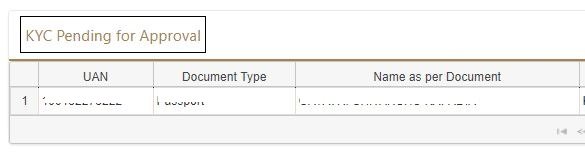
EPF KYC Pending Approval

In case your KYC details are not correctly entered you can press button given below the “Delete” column. This will delete submitted KYC information.

#Step 5

Once your employer approves the changes status will be changed as “Approved by employer”. You will also receive an SMS for the change.

The details will be shown as verified in front of the document.

Apart from KYC, you can also modify your contact details on the portal. In order to do so, please go to “Manage>>Contact Details” from the menu. You will be able to change your registered mobile number and e-mail address.

For the verification, OTP will be sent of the registered mobile number. The details will not get changed immediately.

How to check EPF KYC Compliance Status?

There are three different ways to check EPF KYC compliance status.

#1 KYC Status on UAN Card

You can get KYC compliance status by looking at your UAN card. You can download your UAN card from the e-Sewa Portal.

Your UAN card contains information about KYC. If KYC in your EPF account is completed, you will see ‘Yes’ in front of the KYC information on your UAN card.

#2 Document Approval under the KYC tab

You can check the KYC status of your documents and get compliance details of your KYC. You need to go to the KYC option under the manage tab in the e-Sewa Portal.

You will see all documents that are approved and verified. You need to check Aadhaar and bank details and KYC status to submit an online claim submission.

#3 EKYC Portal EPFO

EKYC portal EPFO was another way to get your KYC compliance status. However, it is closed temporarily due to security reasons.  The steps for checking are given below.

You need to click on the button Track EKYC. On clicking this button, you need to enter your UAN number and captcha code. After entering this information click on the TRACK EKYC button. You will be redirected to the page where you can see KYC status. The message would be “Dear Member, Your Aadhaar Details XXXX XXXX against UAN XXXX XXXX has successfully been verified. Online EPFO services linked with Aadhaar can be availed.”
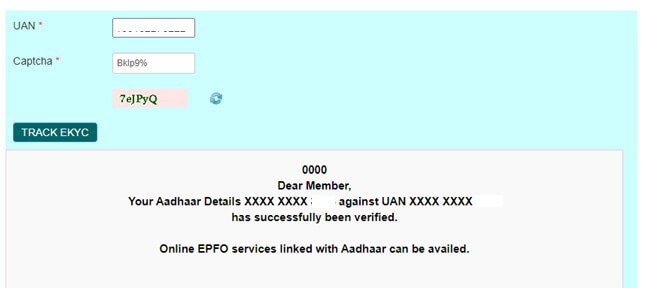
UAN EKYC Track

Frequently asked questions – KYC EPF UAN

Is it mandatory to update these KYC details?

No, it is not mandatory to update these KYC details. However, these details can help you in processing your claim faster. Not only that you can get a regular update on SMS if KYC details are updated.

Can I upload the document directly online?

Yes, you can upload a document by going to the ‘Profile menu’ and selecting ‘Update KYC Information’. The uploaded KYC document will be sent to the employer for verification and Approval. Till the time it is not approved by the employer status of KYC will be shown as “Pending”.

You need to scan the KYC document first and save it as .jpg/.gif/.png/.pdf. These documents can be uploaded online. The size of the scanned document should not exceed 300kb. You can upload multiple documents at the same time.

Also Read – How to Check EPF Balance via SMS EPFOHO

How much time will it take to change approval status?

After uploading your employer has to approve the KYC. Your employer needs a digital signature in order to authorize your KYC. It will take approximately 48-72 hours to change the approval status in the system. The information shall be verified by the appropriate authorities in the system.

Which Documents are considered for KYC?

The following documents are considered for KYC.

  • National Population Register
  • AADHAR
  • Permanent Account Number
  • Bank Account Number
  • Passport
  • Driving License
  • Election Card
  • Ration Card

What to do if my employer is not approving KYC?

Usually, the employer will approve KYC details on the portal. In case your employer is not doing so you can directly approach the administration or HR department with the request. If it is taking more time you can escalate it to higher authority in the organization.

If no one is responding to your request you can approach EPF Grievance via http://epfigms.gov.in

How do I know that the KYC updated by me is approved by the employer?

The status will be shown against the updated KYC document on the same page. The system will also trigger SMS on your registered mobile number.

For more information, you can contact –
Helpdesk Number: 1800 118 005
Helpdesk Email Id: uanepf@epfindia.gov.in

Conclusion –

The facility provided to update KYC on the EPF UAN portal will bring multiple benefits to EPFO subscribers.