

Your Aadhaar card is one of the most important documents in India. It serves as proof of identity and address for many services, like opening bank accounts, filing income tax returns, getting government subsidies, and even verifying your identity online. One key feature of Aadhaar is the linked mobile number. This number is used to send One-Time Passwords (OTPs) for authentication. If your mobile number changes – maybe you got a new SIM, lost your old phone, or switched providers – you need to update it in your Aadhaar records right away.
Picture this: you’re trying to file your taxes online, link a new bank account, or even apply for a government scheme, and suddenly, that one-time password (OTP) just won’t arrive. Frustrating, right? It hits home when you realize your old mobile number, the one you haven’t used in years, is still tied to your Aadhaar card. In a country where Aadhaar powers everything from banking to subsidies, keeping your contact details current isn’t just convenient – it’s essential.
As of late 2025, the process to change mobile number in Aadhaar card has evolved a bit, thanks to UIDAI’s push toward easier digital services. While the classic in-person method remains rock-solid reliable, whispers of app-based updates are turning heads. Whether you’ve switched carriers, lost access to your old SIM, or simply want a fresh start, this guide walks you through it all. We’ll cover the why, the how, and those little tips that make the difference. By the end, you’ll feel confident tackling how to change mobile number in Aadhaar card, no matter your situation.
Why is a Registered Mobile Number Important for Aadhaar?
A registered mobile number plays a big role in Aadhaar services. Here are some common situations where you need it:
- Receiving OTPs for online Aadhaar updates, like changing your address.
- Downloading e-Aadhaar or ordering a PVC Aadhaar card.
- Using the mAadhaar app to carry your Aadhaar digitally on your phone.
- Linking Aadhaar with PAN, bank accounts, or mobile connections.
- Availing government benefits, scholarships, or pensions that require Aadhaar verification.
- Online EPF withdrawals or claims.
- Using apps like DigiLocker or UMANG for various services.
If your old number is no longer active, you won’t get these OTPs, and many services will be blocked. That’s why updating it quickly is essential. The good news is there is no limit on how many times you can change your mobile number. You can do it as often as needed, though each time there is a small fee.
Understanding the Challenges with Outdated Numbers
Ever tried logging into the myAadhaar portal only to stare at your screen, waiting for an OTP that never comes? Yeah, we’ve all been there. If your old number’s gone – maybe you lost the SIM during a move or switched providers years ago – online services grind to a halt.
UIDAI designed it this way for security. That OTP ensures it’s really you making changes. But when access to the old number vanishes, it creates a classic catch-22. You can’t update online without the OTP, and you need the update to get future OTPs. It’s enough to make anyone pull their hair out!
Thankfully, UIDAI hasn’t left folks stranded. That’s where offline options shine, and recent developments hint at smoother paths ahead.
How to Change Mobile Number in Aadhaar Card?
Before starting the update, locate a nearby Aadhaar Seva Kendra or Permanent Enrolment Centre. These are official places run by UIDAI or authorized agencies like banks and post offices.
- Visit the UIDAI website (uidai.gov.in).
- Go to “My Aadhaar” > “Locate Enrolment Centre.”
- Enter your city, pin code, or use your location.
- You can also use the Bhuvan Aadhaar portal for a map view.
Choose a centre that is convenient. Some centres are bank-based or post office-based, and they may have different timings.
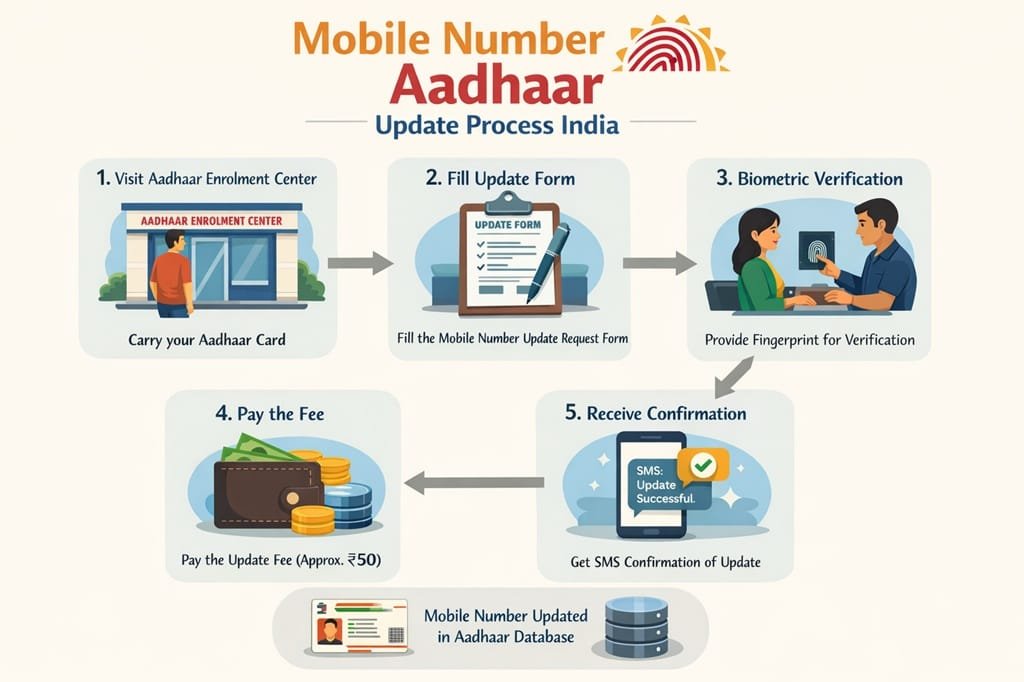
Step-by-Step Guide to Update Mobile Number Offline (Main Method)
This is the standard way to change your mobile number. It works even if you don’t have access to your old registered number.
- Visit your nearest Aadhaar Enrolment Centre or Seva Kendra. Carry your Aadhaar card or number with you.
- Ask for the Aadhaar Correction/Update Form. It’s free, or you can download it beforehand from the UIDAI website (search for “Aadhaar Update Form”).
- Fill the form carefully. In the relevant section, write your new mobile number clearly. Mention any other updates if needed, but for mobile, it’s simple.
- The centre executive will verify your identity using biometrics – usually fingerprints and sometimes iris scan or photo.
- No supporting documents are needed just for mobile update. You don’t have to prove your old number or new one with bills.
- Pay the required fee (details below).
- You will get an acknowledgement slip with an Update Request Number (URN). Keep this safe – it’s like a tracking ID.
The update usually takes up to 30 days, but in many cases, it’s faster, like 5-15 days. You will get an SMS on your new number once it’s done.
How to Book an Appointment Online for Mobile Number Update
Booking ahead makes the visit quicker. Here’s how:
- Go to the official UIDAI website: uidai.gov.in.
- Click on “My Aadhaar” > “Book an Appointment.”
- Choose your city or location.
- Enter a mobile number to receive OTP (this can be any active number, even if not linked to Aadhaar yet).
- Verify with OTP.
- Select the service: Mobile number update.
- Enter your Aadhaar details and choose a centre, date, and time slot.
- Confirm the booking. You can pay the fee online in some cases or at the centre.
- On the appointment day, go to the centre, complete biometrics, and get your URN.
This method is helpful if centres are busy in your area.
Updating Mobile Number Without Old Registered Number or OTP
If you lost access to your old number, don’t worry – the offline process doesn’t need OTP from the old number. Biometrics are enough to prove it’s you. Just follow the steps above. This is one of the most common scenarios, and centres handle it daily.
Fees for Updating Mobile Number in Aadhaar
The standard fee is Rs. 50 for demographic updates like mobile number. This is inclusive of GST and paid at the centre. If you update biometrics at the same time (like fingerprints), there might be extra charges, but for just mobile, it’s Rs. 50.
Note: Enrollment for new Aadhaar is free, and some child biometrics updates are free too
Changing Mobile Number in Aadhaar Card via App
By December 2025, things are getting exciting. UIDAI rolled out a new Aadhaar app that’s shaking things up. Rumors had been swirling about home-based updates, and now it’s becoming reality for some demographics.
Using face authentication and OTP on your new number, you might skip the centre entirely. Imagine snapping a quick selfie, entering your details, and boom – updated! It’s still rolling out widely, but early users rave about the convenience.
If you’re tech-savvy and have access to the app, check for the “Update Aadhaar” section. Select mobile number, follow the prompts for face scan, and submit. No queues, no travel – just you, your phone, and a few minutes.
Of course, if the app option isn’t available yet in your area, fall back to the centre method. Change is coming, but it’s phased.
How to Check Aadhaar Mobile Number Update Status
After updating, track your request easily:
- Visit uidai.gov.in.
- Go to “My Aadhaar” > “Check Update Status.”
- Enter your Aadhaar number or URN, plus captcha.
- The status will show – pending, processed, or rejected (rare, if details mismatch).
You can also call UIDAI helpline 1947 for help.
How to Verify if Your Mobile Number is Linked to Aadhaar
To check if a number is already linked:
- Go to UIDAI website.
- “My Aadhaar” > “Verify Email/Mobile Number.”
- Enter Aadhaar and mobile number.
- It will say if it’s matched or not.
This is useful after update to confirm.
Common Pitfalls and How to Avoid Them
Rushing through? That’s where mistakes creep in. Double-check your new number on the form – a typo means starting over.
Forgot your Aadhaar? Some centres accept alternatives, but better safe than sorry.
Crowded days? Avoid month-ends when everyone’s updating for deadlines.
And if you’re abroad? Plan ahead – NRIs often rope in family or wait for visits, as online still needs that initial link.
Real-Life Stories: Why People Change Mobile Number in Aadhaar Card
Take Raj from Mumbai – he switched jobs, got a new corporate SIM, and suddenly couldn’t access his PF online. A quick centre visit later, problem solved.
Or auntie Meena in a small town, who lost her old phone in a flood. With help from her son, she updated at the local post office centre. Now she’s back to getting pension alerts smoothly.
These aren’t rare tales; they’re everyday wins that come from taking that one step to change mobile number in Aadhaar card.
Tips for a Smooth Experience
- Go mid-week for shorter waits.
- Carry water – queues can drag.
- If elderly or disabled, ask for priority.
- Update linked services (banks, PAN) soon after.
Little things like these turn a chore into a quick errand.
FAQs
Can I change mobile number in Aadhaar card online without visiting a centre?
As of now, fully online is limited, but the new Aadhaar app is enabling it for many with face auth. Check the app first!
How long does it take to change mobile number in Aadhaar card?
Usually 7-30 days, but often quicker.
Is there a fee to change mobile number in Aadhaar card?
Yes, Rs. 50 at centres.
What if I don’t have my old registered number?
No problem – centre visits use biometrics, no OTP needed.
Can I link multiple numbers?
Only one primary, but family sharing is common.
Do I need documents to prove the new number?
Nope, not required.
How do I know if my mobile is already linked?
Try verifying on UIDAI site or during services.
What if the update gets rejected?
Rare, but check status and revisit with URN.
Conclusion
Wrapping it up, learning how to change mobile number in Aadhaar card might seem like a small task, but it packs a big punch in keeping your life hassle-free. Whether you opt for the tried-and-true centre visit or dive into the new app features, the key is acting sooner rather than later.
In a world that’s increasingly digital, that little update ensures you’re not locked out when you need access most. So, grab your Aadhaar, find a centre or download the app, and make the switch today. You’ll thank yourself next time an OTP lands smoothly in your inbox. Stay updated, stay connected – you’ve got this!

