

A new WhatsApp-based service has been launched by the Employees’ Provident Fund Organisation (EPFO) to ease the accessibility of the PF account details by salaried employees. By virtue of this facility, EPF members can see their PF account balance, check the last five transactions and download their EPF passbook through WhatsApp, without visiting any EPFO office.
Until now, it was necessary for the employees to log in on the EPFO Member Portal or through the UMANG app for accessing their PF account details. The new EPFO WhatsApp service has made this process easier, especially for those members who wish to have quick access to their retirement savings through their mobile phone.
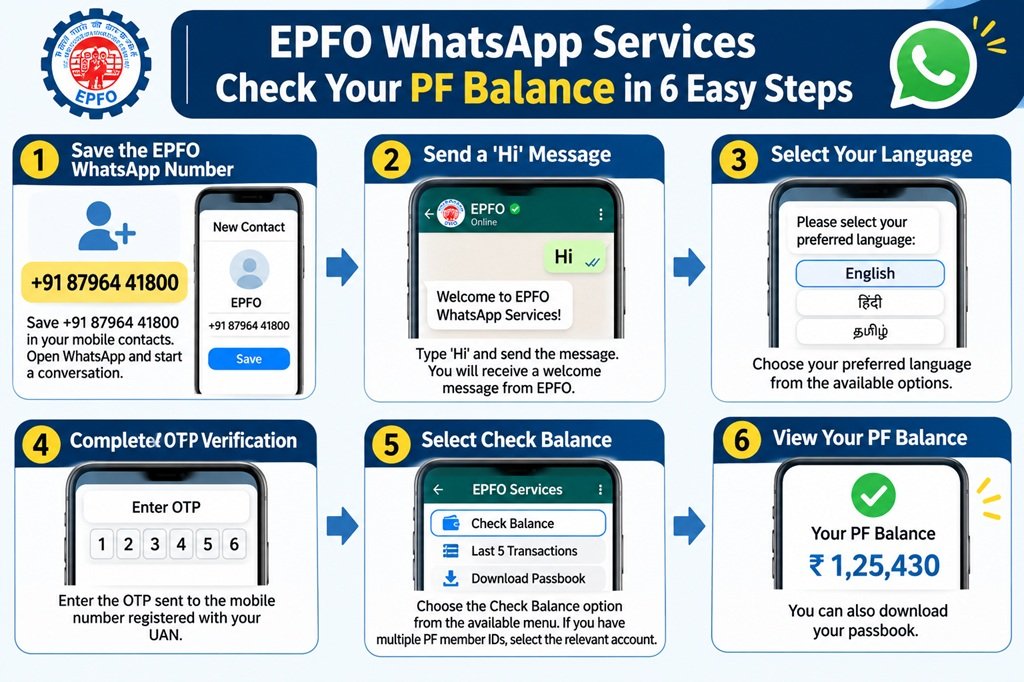
All one needs to do in order to use this facility is to send the message ‘Hi’ to the official EPFO WhatsApp number, +91 87964 41800. Once the verification process is done, the members can select their service and check their PF account details.
In this article, let us see how to use EPFO WhatsApp services and check your PF balance and EPF passbook step by step.
What Are EPFO WhatsApp Services?
EPFO WhatsApp services are the facilities offered by the Employees’ Provident Fund Organisation that would enable members to avail themselves of selected PF account related information through WhatsApp.
This service was launched on November 1, 2026, to commemorate the 74th Foundation Day initiatives of EPFO.
Through this service, EPF members will be able to:
- Check EFP Balance – Get updated about the balance in their EPF account.
- Last 5 PF Transaction – Know about their last five PF transaction details.
- Download EPF Passbook – You can Download EPF passbook in PDF form.
- Gain access to the available services via WhatsApp menu.
- Select their preferred language from the available language options.
This facility makes use of OTP authentication linked to the mobile number of the member registered with the UAN.
How to Use EPFO WhatsApp Services?
The following process has to be followed in order to use EPFO’s WhatsApp services:
- Add EPFO’s official WhatsApp number +91 8796441800 on your contacts list
(It is advised that you use only the WhatsApp number which is connected with the Universal Account Number (UAN) associated with your EPF account. This will help in identifying your account through the OTP verification process.)
- Open WhatsApp and type ‘Hi’ to the EPFO number. You will receive a welcome message from the EPFO WhatsApp services.
- You will receive a message requesting you to choose the language. Choose a language. Provide the OTP which is sent to your mobile number linked with your Universal Account Number (UAN).
- You will be provided with four options in the menu:
- Check Balance
- Last 5 Transactions
- Download Passbook
- Change Language
- Choose any one out of the first three options to avail the EPF service. If you need to change the language, choose the last option.
- OTP request message will be sent by the EPFO to your WhatsApp account containing the two options as Enter OTP and Resend OTP. Your OTP will also be sent to your mobile number registered in the EPFO.
- Choose Enter OTP option on the WhatsApp message and enter the OTP sent to you.
- In case the authentication process is successful, you will get a message confirming it.
- In case you are having multiple Member IDs, the EPFO will require you to enter the appropriate Member ID. In case there is only one Member ID, then you may be receiving directly the details of the service you want.
How to Download Your EPF Passbook using WhatsApp?
EPF passbook will give all information regarding the provident fund contributions, such as contributions made by the employee and employer along with the interest.
Here is how the procedure is followed:
- Use WhatsApp to send ‘Hi’ to the number +91 87964 41800.
- Choose your preferred language.
- Verify OTP process.
- Enter the correct PF Member ID/Account.
- Choose ‘Download Passbook’ or ‘Passbook in PDF’.
- Download your EPF Passbook PDF from the WhatsApp service.
After that, just save the passbook PDF in your phone and view the PF contribution details whenever you want.
What information is provided in the EPF passbook?
- The employee’s monthly contribution towards PF.
- The monthly PF contribution made by the employer.
- Pension contribution under EPS, if applicable.
- The interest credited to the EPF account.
- Withdrawal and transfer entries under PF.
- Account balance available and other details.
How to View Your Last 5 EPF Transactions using WhatsApp?
In addition to knowing the PF balance, EPFO members can also access the details of their last five transactions using the WhatsApp facility.
This facility is especially helpful for those employees who wish to know whether their employers have been making monthly PF contributions on their behalf.
How to check your last five PF transactions?
- Send ‘Hi’ to the EPFO WhatsApp number.
- Choose your preferred language.
- Enter OTP for verification.
- Click on the option of Last 5 Transactions.
- Choose the appropriate PF account if there are more than one member ID associated with your UAN.
- View the details of your last five transactions.
FAQ
What is the official EPFO WhatsApp number?
The official EPFO WhatsApp number is +91 87964 41800. Members can send ‘Hi’ on this number to get PF balance, last transaction information and passbook download facility.
How do I check my PF balance through WhatsApp?
Save the EPFO WhatsApp number +91 87964 41800, send ‘Hi’ and select your preferred language. Perform OTP verification through your registered mobile number and select the Check Balance option.
Is it possible to download PF passbook through WhatsApp?
Yes. EPFO members can download their PF passbook in PDF format through the WhatsApp facility after going through the required verification process.
Is it necessary to have UAN for checking PF balance through WhatsApp?
UAN is needed to identify your EPF account, and the service uses OTP authentication linked to your registered mobile number.
Can I check my last five PF transactions through WhatsApp?
Yes. EPFO members can check their five most recent PF transactions through the WhatsApp facility after going through the required verification process.
Conclusion
The recently introduced EPFO WhatsApp facility is a great way to move forward to making provident fund services easily available to employees. Employees can now find out about their PF balance, get details of the last five transactions, and also get an EPF passbook without having to log into multiple websites.
By just typing ‘Hi’ on +91 87964 41800, employees can get all the necessary information about their PF account through WhatsApp after doing all the necessary verification.

